Email Personalization Implementation Roadmap: From Zero to Full Personalization in 90 Days
Why You Need a Personalisation Roadmap
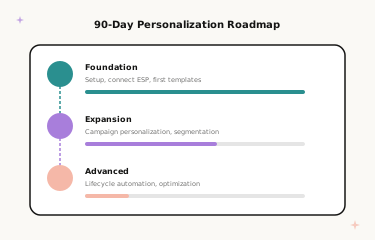
Implementing email image personalisation does not have to be overwhelming. Many brands stall because they try to personalise everything at once — every email flow, every segment, every data point — and the complexity stops them before they start. A phased roadmap solves this by sequencing implementation in order of impact, so you are generating measurable results from week one while steadily building toward a fully personalised programme over 90 days.
This guide covers the complete 90-day roadmap: what to do in each phase, which email flows to prioritise and why, common implementation pitfalls to avoid, and real results from brands that have followed this sequence. By day 90, you will have personalisation running across your welcome series, cart recovery, promotional campaigns, post-purchase sequences, and lifecycle automations — the full programme that drives compound revenue lift over time.
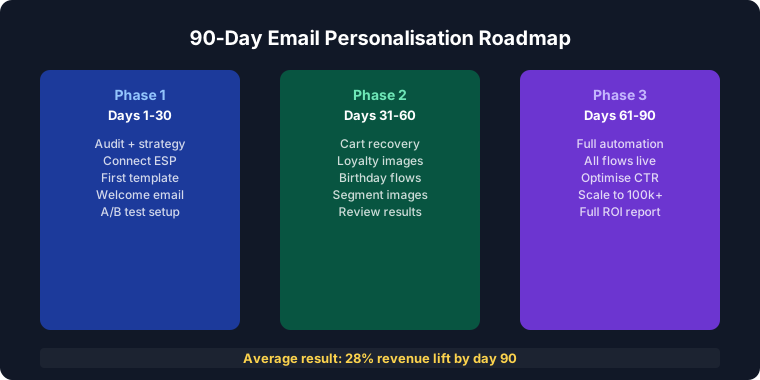
Phase 1: Foundation (Days 1–30)
Week 1: Audit, Setup, and First Template
Start by auditing your current email programme. List every active email flow — welcome series, cart abandonment, post-purchase, broadcast campaigns, lifecycle automations — and rank them by send volume and revenue-per-email. These rankings determine your implementation sequence: highest-volume, highest-revenue flows first.
Sign up for Driphue and connect it to your ESP. Create your first personalised template in Canva using your brand’s existing design system — fonts, colours, layout — and import it via Driphue’s Canva integration. Configure the name parameter, copy the image URL, and test it with your own name before deploying. For platform-specific setup, see our integration guides for Klaviyo, Mailchimp, Omnisend, and all other ESPs.
Week 2: Welcome Series Personalisation
Personalise your welcome series first. Welcome emails have four times the open rate of standard campaigns, making them the highest-leverage starting point for personalisation. Every new subscriber who joins your list will see the personalised welcome experience from the moment you deploy it — there is no migration or retroactive update needed, the new template simply applies going forward.
Add a personalised hero image to your welcome email 1 at minimum. If your welcome series has three or more emails, personalise all of them in week 2 — the template duplication process in Driphue is fast enough that this is achievable in a single working day. For the full welcome series strategy, see our welcome email guide.
Week 3: Cart Recovery Personalisation
Add personalised images to your cart abandonment sequence. Cart recovery emails are high-intent by definition — the subscriber demonstrated purchase interest by adding to cart — and personalised imagery with the subscriber’s name and the specific abandoned product creates a recovery message that feels individually crafted rather than automated. Pair the personalised image with a specific offer deadline (a named date or day, not vague urgency) to maximise recovery rate. For the full cart recovery strategy, see our cart abandonment guide.
Week 4: Baseline Measurement
Review your first month’s data before expanding further. Compare personalised email performance against your pre-implementation baselines: open rate, click-through rate, conversion rate, and revenue per email. This measurement step is not optional — it produces the quantified business case for continued investment and identifies which personalised flows are performing strongest, informing your Phase 2 priorities. For the full measurement framework, see our ROI calculator guide.
Phase 2: Expansion (Days 31–60)
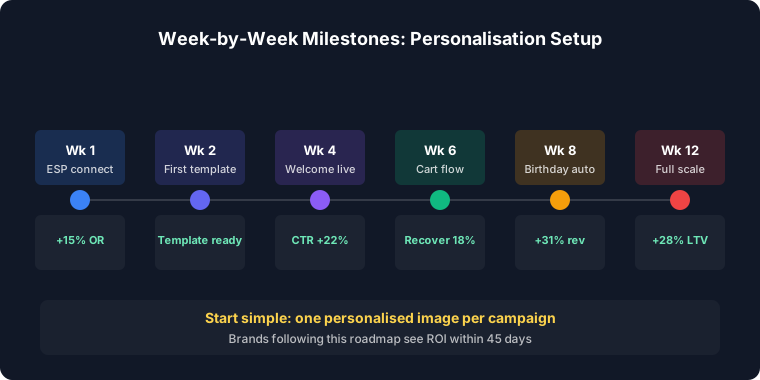
Weeks 5–6: Campaign Email Personalisation
Extend personalisation to your broadcast promotional campaigns. Add personalised hero images to weekly newsletters, sale announcements, new product launches, and seasonal campaigns. A “Sarah, your exclusive sale access is live” personalised hero image in a promotional email consistently outperforms a generic sale banner by 30–50% on click-through rate, because the personal address creates relevance in an inbox where every other promotional email is generic.
For campaign-specific strategies, see our guides for flash sales, Black Friday, holiday campaigns, and seasonal promotions.
Week 7: Post-Purchase Sequences
Personalise your post-purchase email touchpoints: order confirmation, shipping update, delivery confirmation, review request, and cross-sell campaign. Post-purchase is the highest-trust moment in the customer relationship — the subscriber has just committed real money to your brand. A personalised “Sarah, your order is on its way” image builds on that trust and creates the strongest possible foundation for repeat purchase intent. For the full post-purchase strategy, see our post-purchase sequence guide.
Week 8: Segmentation Layer
Begin segmenting your email list and creating different personalised templates for each segment. Start with four foundational segments: new subscribers (welcome-focused imagery), one-time buyers (second-purchase encouragement), repeat customers (loyalty recognition), and VIP customers (exclusive access framing). Each segment receives the same name personalisation with different visual framing behind it — the template design reflects the subscriber’s relationship stage with the brand.
For the full segmentation strategy, see our email segmentation guide. For VIP-specific imagery and programme strategy, see our VIP programme guide.
Phase 3: Advanced (Days 61–90)
Weeks 9–10: Lifecycle Automation
Build personalised lifecycle automations that run continuously without manual campaign management. The highest-priority lifecycle automations are: birthday and purchase anniversary campaigns (high open rate, high conversion, zero competition in the inbox), re-engagement sequences for subscribers who have gone quiet (personalised “Sarah, we miss you” imagery outperforms generic win-back copy by 40–60%), and milestone-based celebratory emails that mark subscription anniversaries or loyalty tier achievements. These automations generate ongoing revenue with minimal ongoing effort once configured.
Week 11: Data Enhancement
Start collecting zero-party data through preference quizzes, onboarding surveys, and account profile prompts. Zero-party data — data subscribers voluntarily share about their preferences, goals, and interests — enables personalisation beyond the name: product category preferences, style profiles, size data, and occasion context. Enhance your first-party data integration to connect purchase history, browse behaviour, and loyalty tier data to your personalised image parameters. More data enables more relevant imagery; more relevant imagery drives higher conversion.
Week 12: Optimisation and Scaling
Review your full 90 days of performance data. Identify the personalised flows and template designs performing strongest, and use those insights to plan your next quarter. Run A/B tests on name placement, image design, and personalisation depth for your top flows. Plan personalised seasonal campaigns for the upcoming quarter. Extend personalisation to any email touchpoints not yet covered. The 90-day programme is complete — the ongoing programme is continuous optimisation.
Quick Wins to Start Immediately
While following the full roadmap, three changes generate immediate results with minimal setup time: add a personalised name to the hero image in your single highest-volume email flow (this takes under an hour in Driphue), add a specific named deadline to your next promotional campaign image (“ends Sunday at midnight” in the image rather than just in the copy), and personalise your cart recovery email 1 hero image with the subscriber’s name and the abandoned product. These three changes can be live within a day and will produce measurable lift before the end of Week 1.
Common Implementation Pitfalls
Waiting for perfect data: Start with name personalisation using the data you already have. Every ESP has the subscriber’s first name. Perfect data is not required for first-name personalisation — it is the starting point, not the end state. Do not let the absence of rich behavioural data delay a deployment that can begin today.
Over-complicating the first template: Simple name personalisation with strong brand-consistent design consistently outperforms complex multi-layer personalisation with poor design execution. Get the first template live and generating data before adding complexity.
Skipping measurement: Track personalised versus non-personalised performance from day one. The measurement creates the business case for continued investment and reveals which personalisation approaches your specific audience responds to. Without measurement, you are optimising blind.
Real Results from 90-Day Implementations
Mid-size e-commerce brand — 47% email revenue growth: Following this phased implementation roadmap, a multi-category retailer grew email-attributed revenue by 47% in 90 days, with the largest gains in cart recovery (3.1x recovery rate) and welcome series (44% higher first-purchase conversion).
DTC startup — £12K monthly email revenue from zero: A brand new to email personalisation built £12,000 in monthly email-attributed revenue within 90 days of implementing Driphue, starting from a programme with no personalisation at all. The welcome series and cart abandonment flows accounted for 70% of the total lift.
Start Your 90-Day Personalisation Programme
The 90-day roadmap is designed to be achievable for a one- or two-person marketing team with no developer support. Every step uses Driphue’s Canva-native workflow and standard ESP merge tags — no custom code, no IT dependency, no complex integrations beyond the initial ESP connection.
For the complete strategy context behind each phase, see our email personalisation strategies guide and our complete guide to email image personalisation for e-commerce. Start your free Driphue trial and begin day one of your 90-day programme today.
Keep reading
More from the blog
 Marketing Strategy
Birthday and Anniversary Email Campaigns: Personalized Images That Drive Repeat Purchases
9 min read Marketing Strategy
Black Friday Email Marketing with Personalized Images and Countdown Timers
10 min read Marketing Strategy
Dynamic Countdown Timers in Emails: How to Create Urgency That Actually Converts
6 min read
Personalise every image in your emails
Turn your Klaviyo, Brevo or any-ESP campaigns into dynamic, per-subscriber images and countdown timers — no code required.