A/B Testing Personalized Emails: How to Optimize Dynamic Images for Higher Conversions
Why A/B Testing Personalised Emails Is Different
A/B testing standard emails is straightforward — test subject lines, CTAs, send times. But when you add dynamic image personalisation to the mix, the testing landscape expands dramatically. You are no longer just testing copy variations — you are testing visual personalisation strategies that fundamentally change how each recipient experiences your email.
The brands that see the biggest returns from email personalisation are not the ones that set it and forget it. They are the ones that systematically test, measure, and optimise their personalised elements over time. This guide covers what to test, how to set up valid tests, advanced testing strategies, and the specific results brands have seen from systematic personalisation testing.
What to Test in Personalised Emails
Personalised Image vs. Static Image
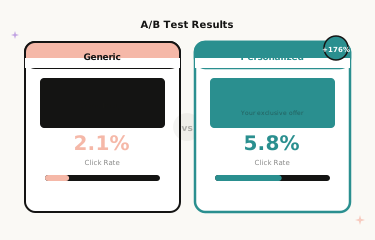
The most fundamental test. Send half your audience a personalised hero image with their name overlaid, and the other half a generic branded hero image. This baseline test typically reveals 25–50% higher click-through rates for the personalised version — but the magnitude varies significantly by brand, audience, and campaign type.
Why this matters: It quantifies the exact revenue impact of personalisation for your specific audience, giving you the business case for further investment. Rather than relying on industry benchmarks, you know precisely what personalisation is worth in your programme.
Name Placement and Design
Where you place the personalised name within the image matters more than most marketers realise. Test name in the headline area versus name in a secondary banner. Test large, prominent name treatment versus subtle, elegant placement. Test first name only versus full name versus first name with a direct greeting (“Sarah, your exclusive offer” versus simply “Sarah”).
Implementation with Driphue: Create two template variants in Canva with different text overlay positions and import both via Driphue’s Canva integration. Duplicate your template and adjust the overlay zone. Your ESP’s A/B test functionality handles audience splitting; Driphue generates the personalised images for each variant identically.
Urgency Framing and Deadline Display
The way you present deadline urgency in personalised images affects conversion rates independently of the deadline itself. Test the deadline displayed prominently within the hero image versus referenced only in email copy. Test a specific clock time (“ends at midnight Sunday”) versus a day-of-week deadline (“ends Sunday”). Test deadline text as part of the personalised hero versus as a separate banner element below the hero.
Brands consistently find that above-the-fold deadline display drives 15–25% higher conversion than below-fold placement, but the optimal design treatment varies significantly by brand aesthetic and subscriber familiarity with the brand’s promotional cadence.
Personalisation Depth
More personalisation is not always better. Test name-only personalisation versus name plus location. Test a single personalised element versus multiple personalised elements in the same image. Test a personalised hero image alone versus a personalised hero plus a personalised product recommendation block.
Some audiences respond best to subtle personalisation — just a name makes the email feel personal without feeling intrusive. Others respond to layered personalisation with location, purchase history context, and behavioural cues. Only testing reveals which approach your audience prefers. For the full segmentation strategy, see our email segmentation guide.
Personalised vs. Category-Segmented Images
Beyond name personalisation, test whether category-personalised imagery — showing each subscriber product images from their actual purchase or browse history — outperforms simple name-personalised imagery. This requires more template variants but often produces the highest click-through rate uplift of any personalisation test, particularly for brands with diverse product catalogues.
Setting Up Valid A/B Tests
Sample Size and Statistical Significance
Personalisation tests need adequate sample sizes to produce reliable results. For most e-commerce brands, aim for at least 1,000 recipients per variant for reliable click-through rate testing. For conversion rate testing further down the funnel, you may need 5,000 or more per variant depending on your baseline conversion rate and expected uplift magnitude.
Run tests for a minimum of one full send cycle to account for different open patterns. Weekend openers behave differently from weekday openers, and early openers — who tend to be the most engaged subscribers — differ from late openers in their response to personalisation. A test that only captures the first few hours of opens will systematically over-represent your most engaged subscribers.
Isolate One Variable at a Time
The most common testing mistake is changing multiple variables simultaneously. If you test a personalised image with a new subject line against a generic image with the old subject line, you cannot isolate which change drove the result. Change one element per test and keep everything else identical — same subject line, same send time, same email copy, same CTA.
Track the Right Metrics
Click-through rate is the primary metric for image personalisation tests, since the personalised image is the primary driver of the click. But also track conversion rate, revenue per email, and unsubscribe rate. A variant that increases clicks but decreases conversions may indicate a disconnect between the image promise and landing page experience. A variant that increases clicks but increases unsubscribes may be generating engagement through surprise rather than genuine relevance.
Driphue tracks image render counts and view analytics, giving you additional data on how personalised images are performing across different email clients and open contexts. For the full measurement framework, see our email personalisation ROI guide.
Advanced Testing Strategies
Sequential Testing for Automated Flows
For automated sequences like welcome series and cart abandonment flows, test personalisation at each touchpoint independently. The optimal personalisation for Email 1 in your welcome series may differ from Email 3. Map out each email in the sequence and run separate tests for each, working through the sequence systematically over your testing calendar.
Segment-Level Testing
Different audience segments may respond differently to personalisation approaches. VIP customers who purchase frequently may prefer subtle, sophisticated personalisation that feels like insider recognition. New subscribers seeing your brand for the first time may respond better to bold, prominent name treatment that signals personal attention. Test personalisation variants across your key segments rather than just your full list — the optimal approach for a first-time subscriber is often different from the optimal approach for a loyal repeat customer.
Seasonal Recalibration
Personalisation effectiveness can shift with seasons. The urgency framing and design treatment that works for flash sales in spring may need adjustment for holiday campaigns in Q4 when inbox competition intensifies and subscriber attention is more fragmented. Run fresh tests at the start of each major seasonal period rather than assuming your previous results carry forward.
Multi-Variate Testing for High-Volume Senders
Brands sending to very large lists — 500,000 subscribers or more — have the statistical power to run multi-variate tests that simultaneously evaluate multiple personalisation dimensions. If your list is large enough to split into four or eight valid test cells, you can test name placement, image design, and personalisation depth simultaneously and identify interaction effects that sequential testing would miss. For most brands, however, sequential single-variable testing produces the clearest actionable results.
Real A/B Testing Results
Skincare brand — 38% CTR lift from name placement test: Testing personalised name in the hero headline area versus a secondary banner revealed that headline placement drove 38% higher click-through rates. This single test improvement generated an additional £9,200 in monthly email-attributed revenue across the brand’s promotional calendar.
Fitness apparel brand — 22% conversion improvement from urgency design test: Testing a bold, high-contrast deadline display versus a brand-matched, on-aesthetic urgency treatment showed the on-brand design actually converted better. Subscribers trusted the brand-consistent framing more than an aggressive urgency treatment that felt inconsistent with the brand’s usual tone — a reminder that effective personalisation always respects brand identity.
Building a Personalisation Testing Culture
The most effective personalisation programmes treat testing as a continuous process rather than a one-time project. Establish a testing calendar at the start of each quarter: plan the tests you will run, the metrics you will track, and the decision rules you will use to implement winners. Document your results and share them across your marketing team. Over time, systematic testing compounds — each improvement builds on previous improvements — and the cumulative lift from a year of disciplined testing consistently outperforms any single “big bang” personalisation launch.
Start Testing Your Personalisation
The difference between good and great email personalisation is systematic testing. Every audience responds differently, and assumptions are expensive. Start with the fundamental test — personalised image versus static image — then progressively optimise placement, design, and depth based on what your specific audience responds to.
For the full picture of what to personalise and how, see our email personalisation strategies guide and our complete guide to email image personalisation for e-commerce. Start your free Driphue trial and run your first personalisation test today.
Keep reading
More from the blog
 Marketing Strategy
Birthday and Anniversary Email Campaigns: Personalized Images That Drive Repeat Purchases
9 min read Marketing Strategy
Black Friday Email Marketing with Personalized Images and Countdown Timers
10 min read Marketing Strategy
Dynamic Countdown Timers in Emails: How to Create Urgency That Actually Converts
6 min read
Personalise every image in your emails
Turn your Klaviyo, Brevo or any-ESP campaigns into dynamic, per-subscriber images and countdown timers — no code required.