Black Friday Email Marketing with Personalized Images and Countdown Timers

Why Black Friday Demands Personalised Email Images
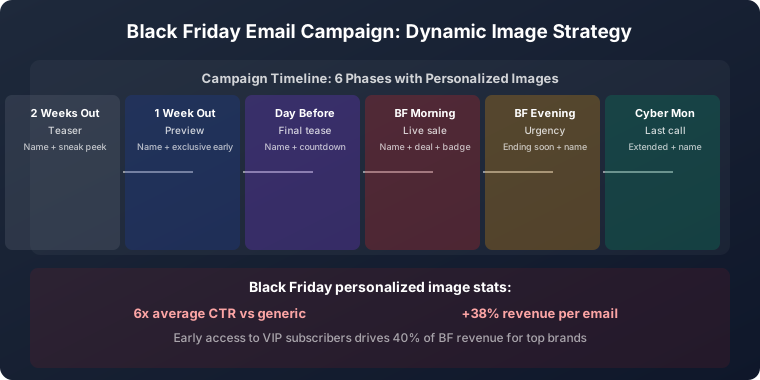
Black Friday is the most competitive email marketing day of the year. Your subscribers receive dozens — sometimes hundreds — of promotional emails during the Black Friday weekend. Generic “SALE” banners get lost in this flood. Personalised images cut through the noise by addressing each subscriber individually, making your Black Friday email the one that gets opened and clicked.
The combination of name personalisation and deadline-based urgency is especially powerful during Black Friday. “Sarah, your Black Friday access starts now” with a clear sale end date creates both personal connection and genuine time pressure that drives action. This guide covers the full Black Friday email sequence, segmentation strategy, design principles, cart recovery, and the specific results brands see from personalised Black Friday campaigns.
The Black Friday Email Sequence with Personalised Images
A high-performing Black Friday programme is not a single email — it is a coordinated sequence starting seven to ten days before the event and running through Cyber Monday. Each phase has a different role, and personalised imagery amplifies the impact of each.
Phase 1: Teaser Campaign (Seven to Ten Days Before)
Build anticipation before the main event. “Sarah, something big is coming” with a personalised teaser image in your Black Friday visual style primes subscribers to watch for your emails. Early teasers face minimal inbox competition and convert the organised shoppers who research deals in advance. They also train subscribers to open your Black Friday emails before the inbox becomes saturated on the day itself.
The teaser does not need to reveal your deals — mystery is fine at this stage. The goal is to establish your brand’s visual identity in the subscriber’s mind before the flood of Black Friday emails begins.
Phase 2: VIP Early Access (One to Two Days Before)
Give your best customers a head start with personalised early access emails: “Sarah, your VIP early access is live.” The exclusive imagery signals the subscriber’s special status and creates a reward that reinforces loyalty while driving revenue before the main sale event. Early access also ensures your highest-LTV customers have already purchased before Black Friday inbox competition peaks.
For VIP programme strategy and how to identify and segment your best customers, see our guide to VIP email programmes with personalised images.
Phase 3: Sale Launch (Black Friday Morning)
The main launch email needs maximum impact. A personalised hero image — “Sarah, your Black Friday deals are here” — alongside your strongest offer and a clear sale end date combines personal recognition with deadline urgency. This is the email that must stand out from every other brand in the subscriber’s inbox on the most crowded email marketing day of the year.
Send early — 6am to 7am in the subscriber’s time zone is the standard recommendation for Black Friday launch. The personalised image gives you an attention advantage at a moment when most emails are competing purely on discount size.
Phase 4: Midday Reminder (Black Friday Afternoon)
A personalised reminder for subscribers who have not yet clicked: “Sarah, deals are still live — ends tonight.” The personal address prevents the reminder from feeling like mass spam, and the specific sale-end time creates genuine urgency. This send typically recovers a significant share of subscribers who saw the morning email but did not act on it immediately.
Phase 5: Last Chance (Black Friday Evening)
Final push with maximum urgency: “Sarah, final hours — Black Friday ends at midnight.” The specific deadline — a named time rather than a vague “hurry” — makes the urgency concrete and believable. This last-chance email consistently captures procrastinators and drives a final-hour revenue spike in the last two hours of the sale.
Phase 6: Cyber Monday
Extend the momentum with a fresh personalised campaign: “Sarah, Cyber Monday deals just dropped.” This is not a continuation of Black Friday — it is a new event with its own visual identity and offer. Cyber Monday captures subscribers who missed Black Friday and those who are ready for a second round of deal shopping, extending the revenue window through the weekend.
Segmentation for Black Friday Personalisation
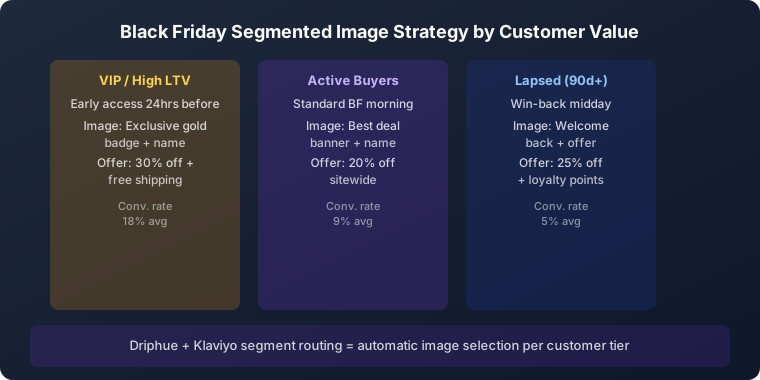
Not all subscribers should receive the same Black Friday sequence. The most effective Black Friday programmes use segmentation to match the personalised image and offer to the subscriber’s relationship stage with the brand. Your ESP’s segmentation logic routes each subscriber to the appropriate template; the first-name personalisation applies identically across all segments.
VIP and high-LTV customers: Early access, exclusive deals, and personalised imagery that signals their special status. These subscribers generate disproportionate Black Friday revenue and deserve a differentiated experience.
Recent purchasers (last 90 days): Cross-sell focused personalised imagery featuring complementary products to recent purchases. Personalised with purchase-adjacent product categories rather than generic deals.
Lapsed customers (90+ days since last purchase): Aggressive re-engagement offers with personalised win-back imagery. “Sarah, we’ve missed you — here’s your Black Friday exclusive” combines personal connection with a compelling return incentive.
New subscribers (last 30 days): First-purchase focused imagery with an introductory incentive on top of the Black Friday deal. These subscribers are in active evaluation mode — Black Friday is an ideal conversion window.
For the full segmentation strategy, see our guide to email list segmentation for personalised images.
Cart Recovery During Black Friday
Black Friday cart abandonment rates are extremely high because shoppers are deliberately comparison-browsing across brands before committing. Personalised cart recovery images with the subscriber’s name and a clear sale-end deadline create urgency that is both personal and time-sensitive: “Sarah, your cart expires when the sale ends.”
Black Friday cart recovery sequences need to be faster than standard recovery flows — triggered within one to two hours rather than the standard 24 hours, given the compressed sale timeline. A two-step recovery sequence (1 hour and 4 hours after abandonment) is appropriate for a same-day sale. For the full cart recovery strategy, see our guide to cart abandonment emails with personalised images.
Design Principles for Black Friday Personalised Images
Bold, high-contrast designs: Black Friday emails compete for attention against dozens of other promotions in the same inbox session. Personalised images need to grab attention instantly. Use bold colours, large personalised name text, and prominent deal information. The subscriber’s name should be the first thing they read.
Mobile optimisation: More than 70% of Black Friday emails are opened on mobile devices. Personalised text must be large enough to read on small screens. Keep the name display prominent and the layout clean. For the full mobile rendering guide, see our mobile email rendering guide.
Fast load times: Black Friday sale-day email volumes put significant load on image rendering infrastructure. Keep personalised image file sizes optimised. Driphue’s rendering infrastructure is built for high-volume events. For general image performance best practices, see our image load time optimisation guide.
Visual consistency across the sequence: The Black Friday sequence should feel like a unified campaign, not six unrelated emails. Use a consistent visual identity — colour palette, typography, layout structure — across all six phases, with the subscriber’s name as the consistent personalisation thread.
Setting Up Black Friday Personalised Images with Driphue
Design your Black Friday image templates in Canva with your campaign’s visual identity — one template per sequence phase. Each template should include a prominent first-name layer and a clear deal/deadline message. Import via Driphue’s Canva integration, configure the name parameter, and append your ESP’s merge tag. For Klaviyo: ?name={{ first_name }}. For the full syntax guide, see our ESP personalisation guide.
Plan your template production timeline: finalise designs by the end of October, test across email clients in early November, and have all six sequence templates live and tested before Black Friday week begins.
Real Results from Black Friday Personalisation
Fashion e-commerce brand — 67% higher Black Friday revenue: Personalised images across a six-email Black Friday sequence generated 67% more email-attributed revenue than the previous year’s non-personalised campaign, with the VIP early access and last-chance emails producing the highest individual conversion rates.
Home goods brand — 4.1x cart recovery rate: Personalised Black Friday cart recovery emails with sale-deadline urgency achieved 4.1x the recovery rate of their standard cart abandonment flow, attributed to the combination of name personalisation and the specific Black Friday deadline framing.
Beauty brand — 52% open rate on VIP early access: Personalised VIP early access images achieved a 52% open rate — nearly triple their average promotional open rate — demonstrating the power of personalised exclusive access imagery for high-LTV subscribers.
Start Preparing Your Black Friday Personalisation
Black Friday success is built in October, not November. Design your personalised Driphue templates early, plan your full six-phase sequence, set up your segmented campaigns, and test everything before the rush. For comprehensive holiday email strategy covering the full Q4 period, see our holiday email marketing guide. For seasonal campaign strategy, see our email personalisation strategies guide. Add animated countdown timers from Tickvio to your Black Friday emails for maximum urgency alongside Driphue’s personalized images.
Keep reading
More from the blog
 Marketing Strategy
Birthday and Anniversary Email Campaigns: Personalized Images That Drive Repeat Purchases
9 min read Marketing Strategy
Dynamic Countdown Timers in Emails: How to Create Urgency That Actually Converts
6 min read Marketing Strategy
Flash Sale Email Campaigns with Personalised Images: Drive Urgency and Conversions
10 min read
Personalise every image in your emails
Turn your Klaviyo, Brevo or any-ESP campaigns into dynamic, per-subscriber images and countdown timers — no code required.