Personalised Welcome Email Images: 12 Examples That Drive First Purchases

Why Welcome Emails Deserve Personalised Images
Welcome emails have the highest open rates of any automated flow, typically ranging from 50 to 80%. This is the moment a new subscriber is most engaged with your brand — they have just signed up, they are curious, and their attention is at its peak. Using a generic hero image during this window is a missed opportunity to establish the brand relationship that drives first-purchase conversion.
A personalised welcome image that greets the subscriber by name immediately signals that this brand pays attention to individuals rather than broadcasting to crowds. It transforms a mass-produced email into something that feels individually crafted — and that impression carries forward into how the subscriber perceives every subsequent email from the brand. For the broader context on how email image personalisation works, see our complete guide.
12 Welcome Email Image Ideas by Industry
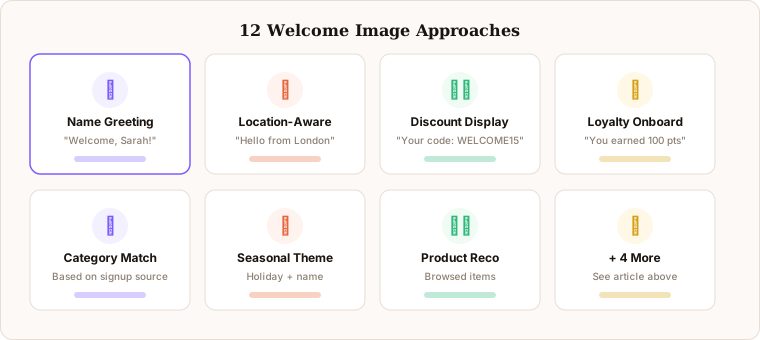
Here are twelve approaches to personalised welcome images, organised by what works best for different types of e-commerce brands.
1. Name greeting hero banner. The simplest and most universal approach. A beautifully designed banner with “Welcome, Sarah” rendered dynamically in your brand’s typography. Works for every product category, every brand tone, and every ESP. It is the right starting point for any brand deploying welcome image personalisation for the first time.
2. Location-aware welcome. “Welcome from London, Sarah” adds a second layer of relevance by acknowledging where the subscriber is. Works especially well for brands with location-based shipping timelines, regional availability, or localised seasonal messaging. City data is available as a standard merge tag in most ESPs.
3. Seasonal personalisation. Combine the subscriber’s name with a seasonally relevant theme. “Sarah, explore our spring collection” feels timely and personal simultaneously. Seasonal welcome images require updating the Driphue template at each seasonal transition, but the relevance lift makes it worthwhile for brands with strong seasonal demand patterns.
4. Category-specific welcome. If you capture product category preferences during signup — through a quiz, a dropdown, or a segmented landing page — show the relevant category in the welcome image. “Sarah, here are the trainers we think you’ll love” is dramatically more relevant than a generic new arrivals grid, and sets the expectation from the first email that your brand pays attention to individual preferences.
5. Discount code display. Render the subscriber’s welcome discount or offer directly in the hero image alongside their name. “Sarah, your 15% off welcome code: WELCOME15” in a visually prominent image placement drives higher code redemption than text-only offers. The visual prominence of the offer inside the image increases redemption because the code is seen in the most attention-capturing part of the email.
6. Loyalty onboarding. “Sarah, you have earned 100 welcome points” introduces your loyalty programme with a personalised starting balance that makes the programme feel immediately tangible and individually relevant. Loyalty onboarding welcome images work particularly well for brands where long-term retention is the primary revenue driver.
7. Brand story introduction. A warm, richly designed image with “Sarah, welcome to the family” works for brands where community and belonging are central to the customer experience — independent makers, values-driven brands, subscription communities. The personalised name makes the community framing feel genuine rather than performative.
8. Product quiz result personalisation. If your acquisition funnel includes a product quiz, show the subscriber’s name alongside their personalised quiz result in the welcome image. “Sarah, your skin profile: Dry and Sensitive” or “Sarah, your style: Modern Minimalist” connects the personalisation directly to information the subscriber voluntarily provided, making it the most relevant first impression possible. For the data strategy behind this, see our zero-party data guide.
9. Referral code showcase. Render the subscriber’s unique referral code visually in the welcome image. “Sarah, share your code SARAH20 with friends” introduces the referral programme immediately and makes the code visually memorable. Welcome emails have the highest open rates in the programme — making the referral ask in the welcome image captures the highest-engagement moment for programme awareness.
10. VIP access preview. For brands with tiered access or early-access programmes, show what the subscriber has just unlocked. “Sarah, as a founding member you get first access to” followed by exclusive product imagery establishes aspirational brand positioning and scarcity from the very first email.
11. Social proof overlay. Combine the subscriber’s name with a community trust signal. “Sarah, join 50,000+ happy customers” leverages social proof alongside personal recognition to reduce the uncertainty that new subscribers often feel. Social proof welcome images work particularly well in higher-consideration categories where purchase hesitation is common.
12. Next-step prompt. “Sarah, your personalised store is ready” with a visual CTA guiding the subscriber to complete their profile, set preferences, or browse curated picks. This approach works best for brands with strong personalisation infrastructure — where the promise of a personalised experience downstream is genuine and the first click genuinely delivers on it.
Setting Up Welcome Images in Driphue
The workflow for welcome email images follows the same four-step pattern as any Driphue personalisation project, with welcome-specific considerations at each stage.
Design in Canva. Create your welcome banner using your brand’s fonts, colours, and photography. Leave clear placeholder text in the name position and any other dynamic zones. For welcome images, the name should be in the most visually prominent area — typically the hero text or the largest typographic element. Test how the design reads with short names (Jo, Kim) and longer names (Aleksandra, Christopher) to ensure the layout works across the full range.
Import to Driphue and add merge tag layers. Import the Canva design into Driphue and add dynamic text layers for first name, city, or any other data your ESP captures at signup. Set fallback values for every dynamic zone: “Friend” for name fields when first name is not available, your home city for location fields when city data is missing.
Generate the personalised URL. Driphue creates the dynamic image URL with the correct merge tag format for your specific ESP, whether that is Klaviyo, Mailchimp, Omnisend, or any other platform.
Paste into your welcome flow. Replace the static hero image in your welcome email template with the Driphue personalised URL. Send a test email to yourself and at least one other inbox, checking rendering across both mobile and desktop clients, before activating the welcome automation.
Timing and Sequence Considerations
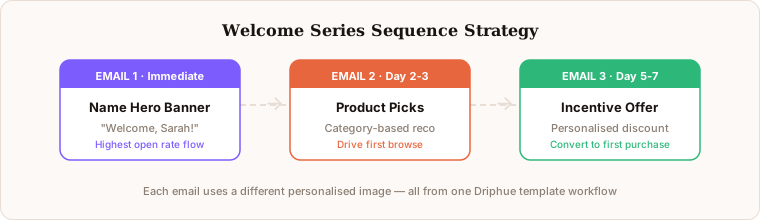
Most welcome series contain three to five emails. The first email is where personalised images have the highest impact because open rates are at their peak and the subscriber is forming their first impression of the brand’s email relationship. For subsequent emails in the series, vary the personalisation approach rather than repeating the same name greeting pattern.
A well-structured personalised welcome series might look like this: Email 1 features a name greeting hero (“Welcome, Sarah”) that establishes the personalised relationship. Email 2 shows a personalised product recommendation or category introduction based on preferences captured at signup. Email 3 displays the subscriber’s loyalty starting balance or introduces a named offer with a specific expiry date (“Your 15% off expires Sunday”). Email 4 or 5 — if the subscriber has not yet purchased — uses a social proof welcome image (“Sarah, join 50,000+ happy customers”) to address hesitation with community validation.
Measuring Welcome Image Performance
Track image views in the Driphue dashboard to see how many subscribers in your welcome flow are engaging with personalised images. Compare click-through rates from your welcome flow before and after introducing personalised images. The most revealing comparison is first-purchase conversion rate from the welcome series — the metric that most directly reflects whether the personalised welcome experience is doing its job.
When A/B testing welcome images, run the test for at least two weeks and a minimum of 200 opens per variant before drawing conclusions. The welcome email audience is self-selecting (high-intent new subscribers), so test results can look stronger than they will be in steady-state. For the full A/B testing methodology, see our A/B testing guide.
From Welcome to Full Lifecycle
Once your welcome flow is personalised, the natural next steps are cart abandonment images, post-purchase follow-ups, and birthday and loyalty emails. Each flow benefits from the same Driphue workflow. The compound effect of personalised visuals across your entire email programme creates a distinctive brand experience that is difficult for competitors to replicate — not because the technology is complex, but because each personalised flow builds subscriber expectations and brand recognition that accumulate over time.
For the complete welcome series strategy, see our welcome series guide. For the 90-day implementation roadmap that shows how to sequence personalisation across all flows, see our implementation roadmap. Start your free Driphue trial and personalise your first welcome image today.
Keep reading
More from the blog
 Email Personalization
The E-commerce Guide to Email Image Personalisation: From First Image to Full Automation
11 min read Email Personalization
Email Image Personalisation Tools Compared: Driphue vs NiftyImages vs Hyperise vs OKZest
10 min read Email Personalization
Email Image Personalization: The Complete Guide for E-Commerce Brands in 2026
8 min read
Personalise every image in your emails
Turn your Klaviyo, Brevo or any-ESP campaigns into dynamic, per-subscriber images and countdown timers — no code required.