NiftyImages vs Driphue: Which Email Image Personalization Tool Is Right for You?
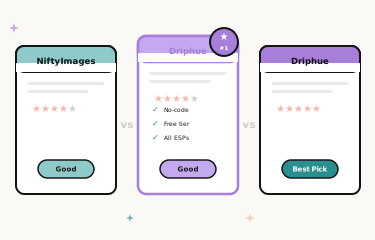
Email Image Personalisation Tools Compared
Choosing the right email image personalisation platform matters. The tool you pick shapes your creative workflow, determines what personalisation use cases you can deploy, affects how quickly your team can move, and has a direct impact on your budget as your programme scales. NiftyImages and Driphue are both widely used in the e-commerce email marketing space, but they approach the problem differently — different design philosophies, different feature priorities, and different target users.
This comparison is designed to give you a clear, honest picture of where each tool excels and where each has limitations, so you can make the right decision for your brand’s specific situation. We cover template design, ESP integration, pricing, e-commerce focus, and image delivery performance — the factors that actually determine whether a personalisation tool delivers ROI in production.
Template Design and Editing
NiftyImages
NiftyImages provides a web-based template editor with pre-built layouts for common email personalisation use cases. The editor supports text overlays, basic image manipulation, and some layout customisation. It is accessible and functional for marketers who want to get started quickly without design expertise. The trade-off is flexibility: the template system has constraints on typography control, layered composition, and pixel-level precision that can make it challenging to match brand-level design standards exactly. Teams with strong visual standards may find the output serviceable but not fully on-brand.
Driphue
Driphue’s design approach is built around Canva import — the insight being that most e-commerce marketing teams already have a Canva library of brand assets, campaign templates, and design elements. Rather than rebuilding those in a proprietary editor, Driphue lets you import your existing Canva designs and map dynamic personalisation zones to them. This means the Driphue personalised image starts from your actual brand design, not a generic template that you adapt toward it. The visual result is consistently on-brand without requiring design-tool expertise beyond what the team already has.
ESP Integration and Compatibility
NiftyImages
NiftyImages supports major ESPs through merge tag integration and generates image URLs compatible with most email service providers. The integration approach is generally functional for standard setups, though the documentation depth varies by ESP and some less common platforms require manual configuration that the support documentation does not fully address.
Driphue
Driphue offers dedicated integration guides with step-by-step instructions for every major ESP, with the merge tag syntax pre-configured for each platform. Dedicated guides are available for Klaviyo, Mailchimp, Omnisend, ActiveCampaign, HubSpot, and 20+ additional platforms. The URL generation automatically formats merge tags in the syntax the selected ESP expects, reducing setup errors for teams moving quickly.
Feature Set and Use Cases
NiftyImages
NiftyImages offers a broader feature set than Driphue in some areas: countdown timers, scratch-off interactive elements, social proof counters, and image personalisation. For brands that specifically need countdown timers or interactive email elements as their primary use case, NiftyImages has more built-in feature depth in those areas. The platform serves a broad range of email marketers across industries and use cases, not exclusively e-commerce.
Driphue
Driphue focuses on merge tag-based image personalisation — rendering subscriber names, loyalty data, location information, and other ESP-stored attributes directly into email images at open time. This covers the personalisation use cases that drive the largest revenue impact for e-commerce brands: welcome series, cart recovery, birthday and loyalty campaigns, post-purchase sequences, and segmented promotional campaigns. For urgency framing in these campaigns, Driphue uses named deadline dates rather than live timers — a design choice based on the insight that specific named deadlines (“your offer expires Sunday 11pm”) are as effective as live countdowns and more reliable across email clients.
Pricing and Value
NiftyImages
NiftyImages uses impression-based pricing tiers. The free tier is available for low-volume testing. As email volume grows, costs scale with impressions, and the pricing structure can become a meaningful line item for high-volume senders. For brands sending large volumes across many flows simultaneously, the per-impression model requires careful monitoring to avoid unexpected cost escalation.
Driphue
Driphue’s pricing is transparent and view-based, with plans starting at $19 per month (Starter), $59 per month (Growth), and $149 per month (Pro). The free tier allows teams to test and validate the setup before committing to a paid plan. There are no annual contract requirements or implementation fees — teams can start, pause, or scale their plan based on actual programme volume without minimum commitments.
E-Commerce Focus
NiftyImages
NiftyImages serves a broad range of email marketers across B2B, B2C, non-profit, and retail. The platform’s features are designed for general email personalisation use cases rather than specifically for e-commerce workflows. This breadth is a strength for non-e-commerce users and a relative weakness for e-commerce brands looking for tooling built around their specific campaign types and data models.
Driphue
Driphue is purpose-built for e-commerce. The campaign type library, integration documentation, and default template examples all reference e-commerce use cases: cart abandonment recovery, post-purchase cross-sell, loyalty tier displays, welcome series conversion. The platform’s design assumptions — that the team uses Klaviyo or a similar e-commerce ESP, that subscriber data includes purchase history and behaviour signals, that the primary personalisation goal is revenue attribution — match what e-commerce brands actually need.
Image Delivery Performance
NiftyImages
NiftyImages delivers images through its CDN with standard loading performance. Image quality is suitable for email display across major clients. Dark mode handling and cross-client rendering are adequate for most use cases.
Driphue
Driphue renders images through a globally distributed CDN optimised specifically for email delivery performance — fast response times that satisfy corporate email security gateway scanner timeouts, automatic compression to optimal file sizes, and retina-ready output for high-DPI displays. Images are optimised for consistent rendering across major clients including Outlook desktop, which requires explicit dimension attributes that Driphue includes in its generated image code. For the complete cross-client rendering guide, see our email client compatibility guide.
When to Choose NiftyImages
NiftyImages is a stronger fit if you specifically need countdown timer functionality as a primary feature and want it built into the same tool as your image personalisation. If you are not primarily an e-commerce brand — B2B, non-profit, events, or other verticals where general personalisation rather than e-commerce-specific flows is the priority — NiftyImages’ breadth serves you better. It is also a reasonable choice if you have a strong preference for the specific interactive elements (scratch-offs, social proof counters) that NiftyImages offers and that Driphue does not.
When to Choose Driphue
Driphue is the stronger choice for e-commerce brands that care about design quality and want personalised images that match their visual brand standards without compromise. If you already have a Canva library and want to leverage it directly rather than rebuild templates in a new editor, the Canva import workflow is a significant practical advantage. If you want deep, documented ESP integrations with e-commerce-specific setup guides, and a pricing structure that is transparent and scales predictably with your programme, Driphue is built for that context.
Making Your Decision
Both platforms solve the core problem of adding personalised images to email campaigns. The right choice ultimately depends on which use cases matter most to your specific programme. For e-commerce brands prioritising design quality, Canva workflow integration, and a platform built around their specific campaign types, Driphue offers the more focused solution. For brands that need countdown timers or interactive elements as primary features, NiftyImages has more built-in depth in those areas.
For the complete personalisation strategy context, see our email personalisation guide. For the broader competitive landscape, see our tools comparison. Start your free Driphue trial to see the design quality and workflow firsthand.
Keep reading
More from the blog
 Marketing Strategy
Birthday and Anniversary Email Campaigns: Personalized Images That Drive Repeat Purchases
9 min read Marketing Strategy
Black Friday Email Marketing with Personalized Images and Countdown Timers
10 min read Marketing Strategy
Dynamic Countdown Timers in Emails: How to Create Urgency That Actually Converts
6 min read
Personalise every image in your emails
Turn your Klaviyo, Brevo or any-ESP campaigns into dynamic, per-subscriber images and countdown timers — no code required.