ActiveCampaign Dynamic Email Images: Complete Integration Tutorial with Driphue
Why ActiveCampaign Users Should Add Dynamic Images
ActiveCampaign’s automation engine is one of the most powerful in the mid-market ESP space — conditional content blocks, CRM integration, site tracking, deal pipeline data, and behavioural triggers that most marketing teams only scratch the surface of. But most ActiveCampaign users have a significant gap between the sophistication of their automation logic and the visual content inside those automations. The conditional logic segments beautifully. The text personalisation works. The images remain generic and static for every subscriber.
Dynamic image personalisation with Driphue closes that gap. By connecting ActiveCampaign’s rich contact data — first name, city, custom fields, CRM properties, loyalty tier, purchase category — to Driphue image templates, every automated email delivers a personalised visual that matches the sophistication of the automation it sits within. A subscriber in a VIP win-back flow sees an image that acknowledges their status. A subscriber in a new-customer nurture sees a warm welcome image with their name. The same automation logic that segments the flow now drives the visual content of every email in it.
How the ActiveCampaign Integration Works
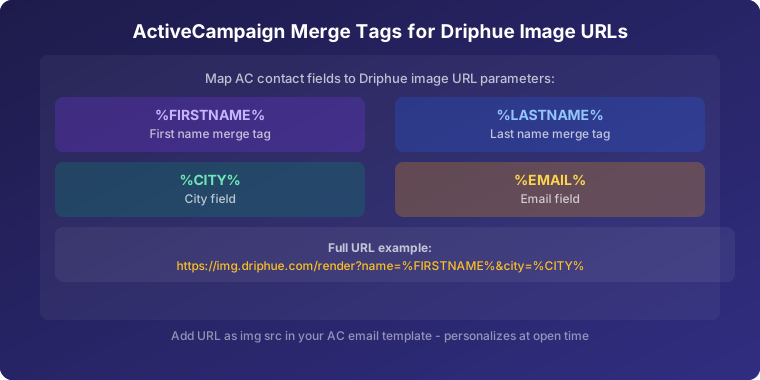
ActiveCampaign supports personalisation tags in image URLs, which makes Driphue integration technically straightforward. ActiveCampaign uses percent-delimited tag syntax for contact fields: %FIRSTNAME% for first name, %LASTNAME% for last name, %CITY% for city, and custom field tags for any additional properties. These tags work in image URL parameters exactly as they do in email body text or subject lines.
Driphue generates a dynamic image URL containing the ActiveCampaign personalisation tags as URL parameters. When ActiveCampaign processes the email for sending, it substitutes the tags with the contact’s actual data. When the subscriber opens the email, Driphue receives the request with the substituted data, renders the personalised image in real time, and serves it. The entire personalisation happens invisibly — the subscriber simply sees their name (or other data) in the image, with no visible difference in the email structure.
This works identically in one-off campaign emails and in all automation types. The same dynamic image URL functions in a welcome sequence, a cart abandonment flow, a re-engagement campaign, or a broadcast campaign send.
Step-by-Step Integration
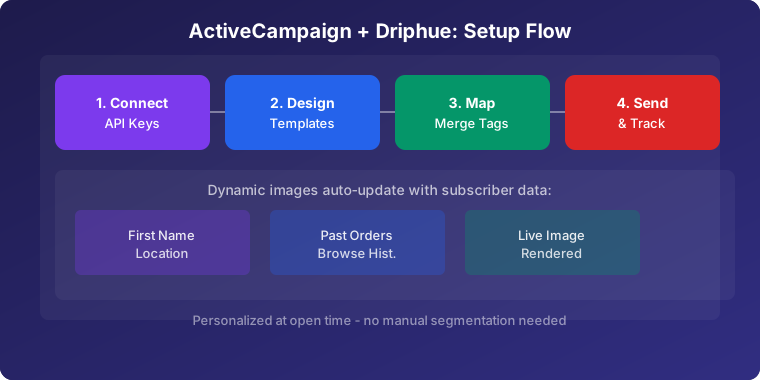
Step 1: Build Your Driphue Template
Create a new image template in Driphue. Design your base image — hero banner, promotional image, loyalty display, or welcome graphic — with your brand colours, typography, and imagery. Add text overlay zones where personalised content will appear. The most common zones are a name overlay in the hero area, an optional secondary zone for city or loyalty tier data, and any campaign-specific data like offer expiry date. Import from Canva if you have an existing brand design to ensure the personalised image starts from your actual visual standards.
Step 2: Configure ActiveCampaign Tags
In Driphue, select ActiveCampaign as your ESP. Map your template text zones to the corresponding ActiveCampaign personalisation tags. Standard mappings include %FIRSTNAME% for the name zone, %CITY% for any location zone, and custom field tags for properties like loyalty tier, membership level, or last purchase category. Driphue generates the properly formatted dynamic image URL with all tags embedded. Set fallback values for every mapped field — "Friend" for names, your brand’s home city for location, or an appropriate generic for custom fields — to handle contacts with incomplete profile data gracefully.
Step 3: Embed in Your Email
Copy the dynamic image URL from Driphue. In ActiveCampaign’s email designer, add an image block and paste the URL as the image source. For the HTML editor, insert a standard <img> tag with the dynamic URL as the src attribute and explicit width and height attributes for reliable cross-client rendering. Add personalised alt text using the same tag syntax — %FIRSTNAME%, your exclusive offer is waiting — to ensure subscribers with images disabled receive a personalised text fallback.
Step 4: Use in Automations
ActiveCampaign automations are where personalised images deliver their highest impact. Add your dynamic image emails to welcome sequences, cart abandonment flows, post-purchase follow-ups, loyalty milestone triggers, and re-engagement campaigns. The personalisation tags work identically in automations as in campaigns, and all contact data available in the automation context — including event data from site tracking and deep data integrations — is accessible for image personalisation.
Step 5: Test Before Activating
Use ActiveCampaign’s "View as contact" preview feature to check how the personalised image resolves for specific contacts before activating any automation. Preview for a contact with complete profile data (first name, city, all custom fields populated), and separately for a contact with intentionally blank fields to verify fallback values render correctly. Send test emails to both and check rendering across mobile and desktop clients. For cross-client testing guidance, see our compatibility guide.
ActiveCampaign Features That Enhance Image Personalisation
Conditional Content Blocks
ActiveCampaign’s conditional content feature lets you show different Driphue image URLs to different segments within the same email template. Show a VIP-themed personalised image to contacts tagged as high-value customers and a different welcome design to new subscribers — within a single campaign send. This creates segment-specific visual experiences without building separate campaigns for each audience, and combines the efficiency of unified campaign management with the relevance of individually targeted imagery.
CRM Data Integration
ActiveCampaign’s built-in CRM stores deal values, pipeline stages, account properties, and custom contact fields that can power image personalisation beyond standard name and location data. A contact in the "trial" pipeline stage sees trial-specific nurture imagery; an active paying customer sees retention-oriented visuals. Use custom fields like membership tier, last purchase category, loyalty points balance, or preferred product category to drive visual personalisation that reflects the full depth of the CRM data your team has already invested in capturing.
Site Tracking Data
ActiveCampaign’s site tracking captures browse behaviour — which pages a contact has visited, which product categories they have viewed, which pages they have repeatedly returned to. This behavioural data can trigger personalised automation emails where the image reflects the specific category the contact was browsing. A contact who viewed running shoes twice in the past week triggers an automation with a personalised image featuring their name alongside running product imagery, creating a relevance signal that connects the email directly to their demonstrated interest.
Best ActiveCampaign Automations for Personalised Images
Welcome series: Personalised welcome images establish the individual relationship from the first email. Use ActiveCampaign’s welcome automation to deliver a sequence of personalised visual touchpoints, with each email in the series deepening the personalisation — name in email 1, category preference in email 2, loyalty starting balance in email 3. For the complete welcome strategy, see our welcome series guide.
Cart abandonment: ActiveCampaign’s deep data integration with Shopify, WooCommerce, and other e-commerce platforms enables cart-level personalisation in abandonment flows. Personalised images showing the subscriber’s name and the product category they abandoned recover carts with higher relevance than generic recovery emails. For the full cart recovery strategy, see our cart recovery guide.
Win-back campaigns: Re-engage lapsed contacts with personalised images that reference their name and acknowledge the gap. "We miss you, Sarah — here’s what’s new since your last visit" with a named offer expiry date ("your welcome-back offer expires Friday") drives significantly higher re-engagement than generic win-back emails. For the re-engagement strategy, see our re-engagement guide.
Birthday and milestone emails: Use ActiveCampaign’s date-based automation triggers to send personalised birthday images and purchase anniversary acknowledgements. "Happy Birthday, Sarah" in a beautifully designed celebratory image drives redemption rates significantly above generic birthday email benchmarks. For the birthday campaign strategy, see our birthday guide.
Real Results from ActiveCampaign Users
SaaS company — 29% trial-to-paid conversion lift: Adding Driphue personalised images to their ActiveCampaign trial nurture sequence — replacing generic feature-highlight banners with personalised images using the trial user’s first name and company name — increased trial-to-paid conversion from 8.3% to 10.7%, generating significant additional annual recurring revenue from the same lead volume.
Home goods retailer — 47% higher automation revenue: Personalised images deployed across all ActiveCampaign automated flows — welcome series, cart abandonment, post-purchase cross-sell, and win-back — increased total automation-attributed revenue by 47% in the first quarter after full implementation, with cart abandonment and welcome series delivering the strongest individual lifts.
Start Personalising Your ActiveCampaign Emails
ActiveCampaign’s automation sophistication deserves visual content that matches it. Driphue adds personalised images to every flow in your ActiveCampaign account without adding operational complexity — the Driphue URL is a one-time setup per template, and the personalisation renders automatically for every contact in every send thereafter.
For the complete personalisation strategy, see our email personalisation guide. For the universal ESP integration workflow, see our universal ESP guide. Start your free Driphue trial and add personalised images to your ActiveCampaign workflows today.
Keep reading
More from the blog
 Email Personalization
The E-commerce Guide to Email Image Personalisation: From First Image to Full Automation
11 min read Email Personalization
Email Image Personalisation Tools Compared: Driphue vs NiftyImages vs Hyperise vs OKZest
10 min read Email Personalization
Email Image Personalization: The Complete Guide for E-Commerce Brands in 2026
8 min read
Personalise every image in your emails
Turn your Klaviyo, Brevo or any-ESP campaigns into dynamic, per-subscriber images and countdown timers — no code required.