Email Client Compatibility for Personalized Images: What Works in 2026

Why Email Client Compatibility Matters
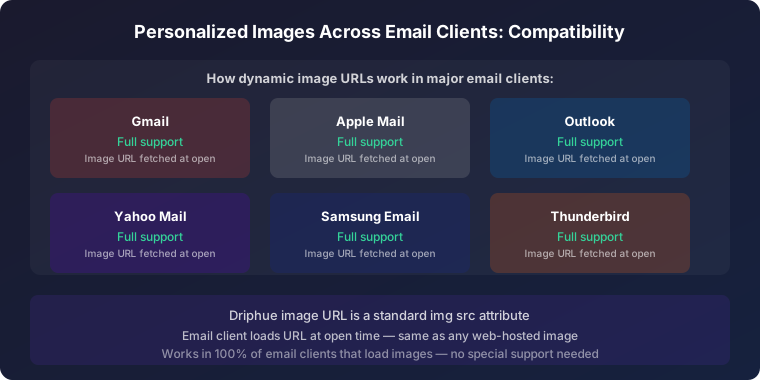
There are dozens of email clients in active use, and each renders HTML, CSS, and images differently. A personalised image that looks perfect in Apple Mail might display incorrectly in Outlook desktop, load slowly due to aggressive proxy caching, or get blocked entirely in certain corporate environments. Understanding email client compatibility is not a technical edge case — it is a prerequisite for ensuring every subscriber actually sees your personalised images as designed.
This is especially relevant for dynamic personalised images, which are generated at open time rather than pre-rendered at send. Some email clients cache aggressively; others re-fetch on every open. Some support modern CSS that enables responsive image sizing; others use legacy rendering engines that require explicit HTML attributes. This guide covers the behaviour of every major email client in 2026, the compatibility issues most likely to affect personalised images, and the solutions and testing approach that ensure consistent rendering across your entire subscriber base.
Major Email Client Rendering Behaviour
Apple Mail (iOS and macOS)
Apple Mail is the most capable and forgiving email client for personalised images. It supports modern CSS, renders images reliably at retina quality, handles responsive design gracefully, and manages dark mode with sophisticated inversion logic. For brands with a significant Apple ecosystem audience — which means most B2C e-commerce brands — Apple Mail typically accounts for 35–50% of opens.
One important consideration specific to personalised images: Apple’s Mail Privacy Protection (MPP), introduced in iOS 15, pre-fetches emails through Apple’s proxy servers, which inflates open rate metrics. For Driphue personalised images, MPP also means the image may be pre-fetched by Apple’s proxy before the subscriber actually opens the email. Driphue handles this by generating personalised images that cache correctly for each unique subscriber URL, so the subscriber still sees their personalised name regardless of when the fetch occurs. For the full MPP guidance, see our Apple MPP guide.
Gmail (Web and App)
Gmail routes all images through its image proxy servers, fetching and caching images on Google’s infrastructure rather than requesting them directly from the sender’s server on each open. For personalised Driphue images, this works correctly because each subscriber’s image URL is unique — Gmail’s proxy caches each subscriber’s personalised image separately rather than serving one cached image to all recipients.
The most important Gmail-specific constraint is the 102KB email HTML size limit. Emails exceeding this threshold are clipped — Gmail hides content below the clip point behind a "View entire message" link that many subscribers never click. Keep total email template HTML lean, and keep personalised image files under 100KB to avoid contributing to HTML bloat via large inline base64 data.
Gmail supports most modern CSS properties in both its web interface and mobile apps. The Gmail web interface historically had CSS quirks (particularly around