What Are Dynamic Images in Email? (And Why Static Images Are Costing You Clicks)
What Are Dynamic Images in Email?
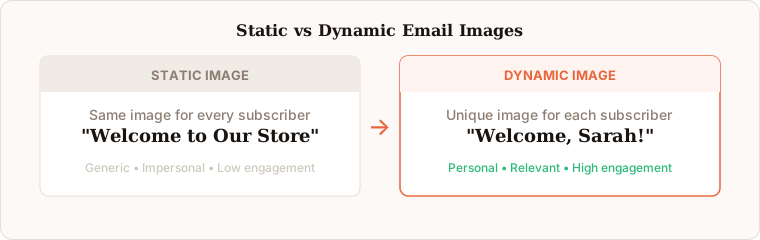
A dynamic image in email is an image that changes based on recipient data. Instead of every subscriber seeing the same static banner, dynamic images pull information like names, locations, purchase history, or loyalty points from your ESP and render a unique visual for each person.
The mechanics are simple: your email contains an image URL with merge tags. When the email is sent, your ESP replaces those tags with actual subscriber data. The image server receives the request and renders a personalised image on the fly.
This is different from dynamic text personalisation, which most marketers already use. Dynamic images bring that same concept to the visual layer of your email, which is where most attention goes. For a complete overview of the landscape including terminology variations, see our complete guide to email image personalisation.
How a Dynamic Image URL Actually Works
Every dynamic image starts with a URL. The URL contains merge tags that your ESP replaces with subscriber data before the email is delivered. When Sarah from London opens her email, the image server receives a request with her specific data and returns an image customised for her.
Each subscriber gets a unique URL, which means each person sees a unique image. This is fundamentally different from a static image where every subscriber sees the exact same file.
The rendered image is a standard JPEG or PNG. The subscriber's email client receives a normal image file — there is nothing unusual about the format. The personalisation happens on the server side, invisibly, before the image is delivered. The result is simply a picture that happens to have the subscriber's name, or city, or loyalty points, rendered into it in your brand's typography and visual style.
With Driphue, you do not need to understand URL construction in detail. You import your design from Canva, add merge tag text layers, and Driphue generates the correct URL for your ESP automatically.
Why Static Images Are Costing You Clicks
Static email images have a fundamental limitation: they treat every subscriber identically. A generic "Welcome to our store" banner has to speak to everyone, which means it speaks powerfully to no one.
The inbox is increasingly competitive. Every brand your subscribers are opted into is competing for attention in the same inbox at roughly the same time. A static banner with your brand name and a generic promotional headline is functionally identical to the dozen other brands sending promotional emails that week. A dynamic image with the subscriber's own name in your brand's visual style is immediately different — and the subscriber notices.
Consider these scenarios where dynamic images consistently outperform static:
Welcome emails with a generic hero image versus one that says "Welcome, Sarah" with her name rendered into a beautifully designed banner. The personalised version creates an immediate emotional connection that a static image cannot. First-name personalisation in welcome image heroes consistently generates 25–40% higher click-through rates versus identical emails with static banners.
Cart abandonment emails that show the actual product the shopper left behind with their name on the image versus a generic "You forgot something" graphic. The dynamic version triggers specific product recall and personal recognition simultaneously. When a subscriber sees their name alongside the specific product they were considering, the relevance is immediate and the recovery rate climbs.
Loyalty emails displaying actual points balance and tier status versus a generic "Check your rewards" banner. When a subscriber sees their exact 2,450 points in the image, engagement becomes personal and immediate. The loyalty programme feels tangible rather than abstract, and the subscriber is motivated to take action rather than defer.
Re-engagement campaigns showing a personalised "We miss you, Sarah" image versus a generic win-back banner. The personal address in the image signals that the brand is aware of the individual lapse rather than sending a bulk re-engagement blast to everyone who has not opened in 90 days. The subscriber is more likely to feel genuinely welcomed back rather than mass-processed.
The difference is not subtle. Personalised visuals cut through inbox noise because they signal to the recipient that this email was made specifically for them.
Common Myths About Dynamic Email Images
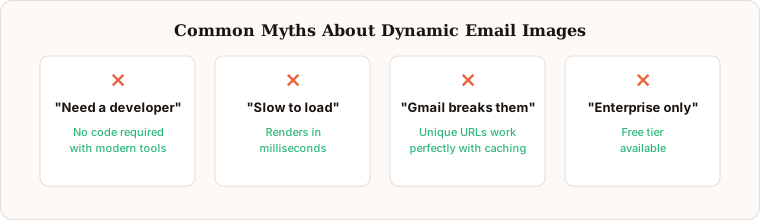
Several misconceptions prevent marketers from adopting dynamic images. Understanding which of these are genuine constraints and which are outdated assumptions determines whether a brand adopts personalisation in the next month or delays indefinitely.
"You need a developer." This was true five years ago. Modern tools like Driphue handle the entire technical pipeline. You design in Canva, add merge tags in Driphue, and paste a URL in your ESP. No code required. Most marketers complete their first personalised image in under an hour from signing up.
"They are slow to load." Well-optimised dynamic image servers render personalised images in milliseconds. Driphue's CDN-delivered infrastructure serves personalised images with response times that are imperceptible to subscribers. The subscriber never notices a difference in loading time compared to static images, and the rendering happens before the subscriber has even finished visually scanning the email header.
"Gmail will break them." Gmail does cache images, but name-based personalisation works perfectly because each subscriber URL is unique. Gmail caches each unique URL separately. Sarah's personalised image URL and James's personalised image URL are different URLs, so Gmail caches them independently. The caching concern applies only to content that needs to change between multiple opens, not to name and data personalisation where the data is stable.
"Only enterprise brands can afford it." Driphue starts at $19 per month. You do not need a Movable Ink budget — which runs to five figures annually — to personalise your email images. The price difference is not marginal; it is a factor of hundreds. Mid-market and growing e-commerce brands access the same core personalisation capability at a fraction of the enterprise platform cost.
"My ESP already does personalisation." ESP text personalisation (merge tags in subject lines and body copy) is table stakes. Visual personalisation — rendering subscriber data into the actual image pixels — is a separate capability that no ESP natively provides at the image rendering layer. Driphue adds this capability on top of any ESP, working with 20+ platforms through the same URL-based mechanism.
What Data Can You Personalise in Email Images?
The range of data available for image personalisation is broader than most marketers realise. Any data your ESP stores as a contact property can be passed to a dynamic image.
The most widely used personalisation variables are first name, last name, and city — available as standard fields in virtually every ESP. These alone cover the core use cases: name greetings in welcome emails, location-aware seasonal messaging, city-specific event promotions.
Beyond the basics, e-commerce-specific data extends the possibilities significantly. Purchase history enables product category imagery tailored to what the subscriber has previously bought. Loyalty tier data enables status-acknowledgment imagery (“Sarah, you’re a Gold member”). Points balance data enables tangible loyalty programme communications. Cart event data in platforms like Klaviyo enables product-specific abandonment imagery. Custom profile properties — dietary preference, style quiz result, pet name, subscription renewal date — enable deep personalisation that connects directly to zero-party data your subscribers voluntarily provided. For the full data strategy, see our zero-party data guide.
How to Get Started with Dynamic Email Images
The fastest path to your first dynamic image takes about five minutes once you have a Driphue account.
Step 1: Design your email banner in Canva. Use your existing brand templates or start fresh. Leave a clear area where the subscriber's name or other dynamic data will appear.
Step 2: Import the design into Driphue and add text layers with merge tags for the data you want to personalise. For a first project, a single first-name layer is sufficient — simplicity at the start lets you validate the setup before adding complexity.
Step 3: Copy the personalised image URL into your ESP template. Driphue generates the correct merge tag format for Klaviyo, Mailchimp, HubSpot, ActiveCampaign, and 20+ other ESPs.
Step 4: Send a test email and see your name rendered into the image. Verify it looks correct in both mobile and desktop email clients, then check the fallback renders properly by testing with a blank name field.
Step 5: Activate your flow or campaign and monitor click-through rate over the first two weeks. The performance lift from a single personalised hero image in a high-volume flow is typically visible within days.
Start with your highest-volume flow. For most e-commerce brands, that means welcome emails or cart abandonment. One personalised hero image in your top flow is enough to see the impact before expanding further. For the full 90-day implementation plan, see our implementation roadmap.
Dynamic Images Across Your Full Email Programme
Once the first personalised image is live and performing, the natural expansion is to deploy dynamic images across every automated flow: welcome series, cart abandonment, post-purchase follow-up, birthday and loyalty, re-engagement, and seasonal campaigns. Each flow benefits from the same Driphue workflow, and the compound effect of personalised visuals across all flows creates a brand experience that is visually distinctive and individually attentive at every subscriber touchpoint.
For a complete strategy covering every flow and campaign type, see our email personalisation guide. Start your free Driphue trial and send your first personalised image today.
Keep reading
More from the blog
 Email Personalization
The E-commerce Guide to Email Image Personalisation: From First Image to Full Automation
11 min read Email Personalization
Email Image Personalisation Tools Compared: Driphue vs NiftyImages vs Hyperise vs OKZest
10 min read Email Personalization
Email Image Personalization: The Complete Guide for E-Commerce Brands in 2026
8 min read
Personalise every image in your emails
Turn your Klaviyo, Brevo or any-ESP campaigns into dynamic, per-subscriber images and countdown timers — no code required.