What Gmail Image Caching Actually Does
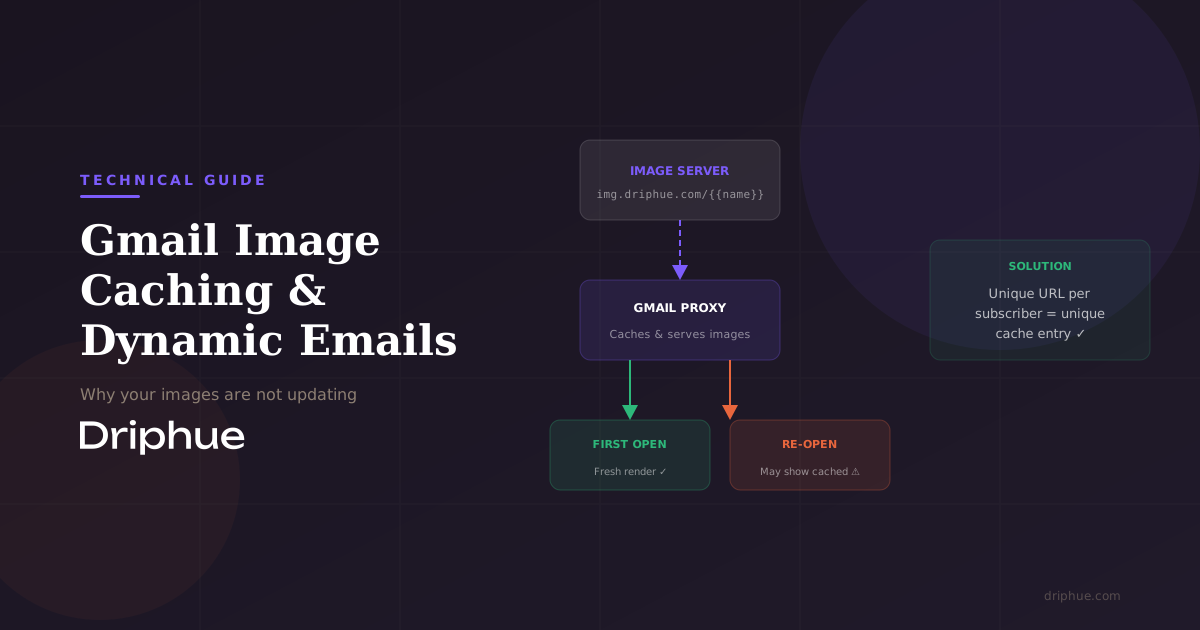
In 2013, Gmail began routing all email images through its own proxy servers. Instead of the recipient email client fetching images directly from your server, Gmail downloads the images first, caches them on Google infrastructure, and then serves them to the subscriber from cache.
This was originally a security and performance improvement that protects subscribers from tracking pixels and speeds up email rendering. But for anyone using dynamic email images, it introduced a significant constraint: once Gmail caches your image, subsequent opens may show the cached version rather than a freshly rendered one.
If you are new to dynamic email images, our complete guide to email image personalisation covers the full landscape including how personalised images work, common use cases, and how to choose the right tool.
Why Your Dynamic Images Are Not Updating on Re-Opens
If you have ever tested a dynamic email image and noticed it looks correct on the first open but shows stale content on subsequent opens, Gmail caching is almost certainly the reason.
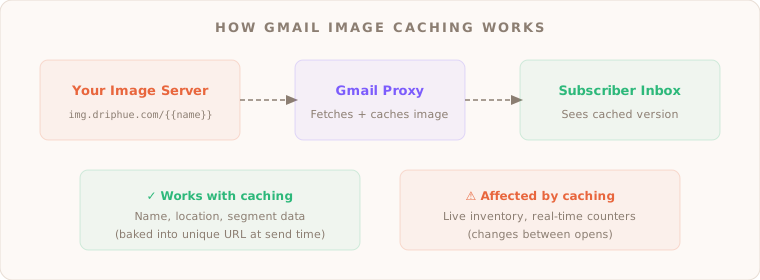
When an email is delivered, Gmail proxy fetches all images and stores them. The first time the subscriber opens the email, they see the freshly fetched version and your dynamic image renders correctly with all personalisation data.
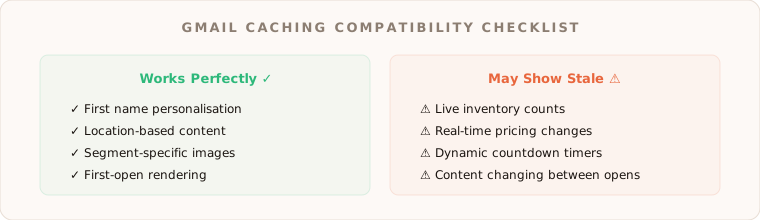
On subsequent opens, Gmail may serve the cached version instead of making a new request to your image server. This means any content that was supposed to change between opens, like a live inventory count, will appear frozen at whatever state it was in during the initial fetch.
The important distinction here: personalisation data baked into the URL at send time still works perfectly. If your image URL includes the subscriber first name as a parameter, that name is part of the unique URL and it will render correctly on every open, cached or not. The caching issue primarily affects content meant to change dynamically between opens.
What Still Works Despite Gmail Caching
Understanding what does work is just as important as knowing the limitations:
Name personalisation: Since the subscriber name or any other merge tag data is encoded in the image URL at send time, each subscriber gets a unique URL. Gmail caches each unique URL separately, so Sarah sees Sarah and James sees James, exactly as intended.
Location-based personalisation: Same principle. If your URL includes a city or region parameter from your ESP merge tags, the cached image already contains the correct location data.
Segment-based visuals: If you are showing different images to different customer segments (VIP vs standard for example), this works because each segment generates a different URL.
First-open rendering: The initial fetch is always fresh. For most e-commerce use cases like welcome emails and cart abandonment, the first open is the one that matters most.
Practical Workarounds and Best Practices
If you are building personalised email images for e-commerce, here are the strategies that work reliably regardless of Gmail caching behaviour:
Design for the first open. Since the first fetch is always fresh, make sure your most important personalisation is visible immediately. For most e-commerce use cases this is exactly what you want.
Use unique URLs per subscriber. This is the single most effective technique. When each subscriber image URL is unique because it contains their specific merge tag data, Gmail caches each version separately. Driphue handles this automatically as every personalised image URL is unique to the recipient.
Set appropriate cache headers. While Gmail proxy does not always respect standard HTTP cache headers, setting short cache-control values can sometimes influence refresh behaviour. This is more of a best-effort approach than a guaranteed solution.
Test across clients. Do not just test in Gmail. Check your images in Apple Mail, Outlook, Yahoo, and mobile clients. Each handles image caching differently and your design should look great in all of them.
How Driphue Handles Gmail Caching
Driphue generates unique image URLs for every recipient using your ESP merge tags. Because each URL is distinct, Gmail proxy caches them individually meaning each subscriber always sees their personalised version.
For e-commerce personalisation including names, products, and loyalty data, this approach works seamlessly with Gmail caching. You do not need to fight the proxy. You just need to ensure your personalisation data is in the URL, which Driphue handles by default.
The Driphue dashboard tracks image views, giving you visibility into how many times your personalised images are actually being rendered across cached and non-cached scenarios.
Driphue works with all major ESPs including Klaviyo, Mailchimp, HubSpot, and 20+ more. If you are evaluating personalisation tools and want to understand how Driphue compares to NiftyImages on features, pricing, and e-commerce fit, we have put together an honest comparison.
Keep reading
More from the blog
 Email Personalization
The E-commerce Guide to Email Image Personalisation: From First Image to Full Automation
11 min read Email Personalization
Email Image Personalisation Tools Compared: Driphue vs NiftyImages vs Hyperise vs OKZest
10 min read Email Personalization
Email Image Personalization: The Complete Guide for E-Commerce Brands in 2026
8 min read
Personalise every image in your emails
Turn your Klaviyo, Brevo or any-ESP campaigns into dynamic, per-subscriber images and countdown timers — no code required.