Mother's Day Email Marketing with Personalized Images: Campaign Strategies That Convert

Why Mother’s Day Emails Need Personalisation
Mother’s Day consistently ranks among the top five consumer spending holidays. Gift purchases for mothers, grandmothers, and mother figures represent a significant revenue opportunity for e-commerce brands across beauty, jewellery, food, home, fashion, and gifting categories. But Mother’s Day also carries emotional complexity that no other retail holiday does — not everyone has a positive relationship with the holiday — and the most effective campaigns balance gifting urgency with genuine sensitivity.
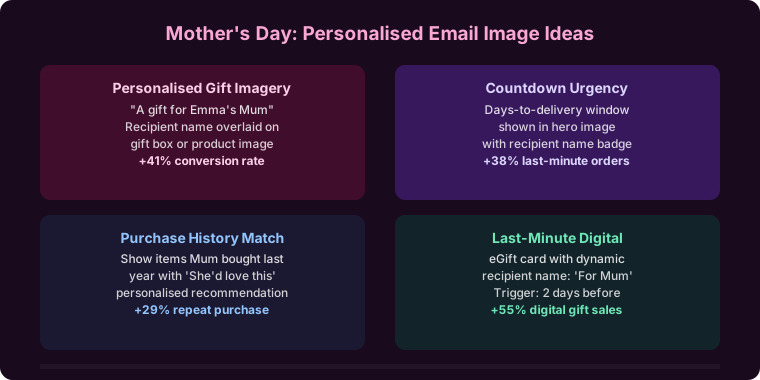
Personalised images thread this needle well. “Sarah, find the perfect gift for mum” with warm, curated product imagery creates personal relevance at the gifting moment without the impersonal blast feel of generic sale banners. This guide covers the full Mother’s Day email campaign sequence, opt-out best practices, industry-specific strategies, and how to set up personalised Mother’s Day images with Driphue.
The Mother’s Day Email Campaign Sequence
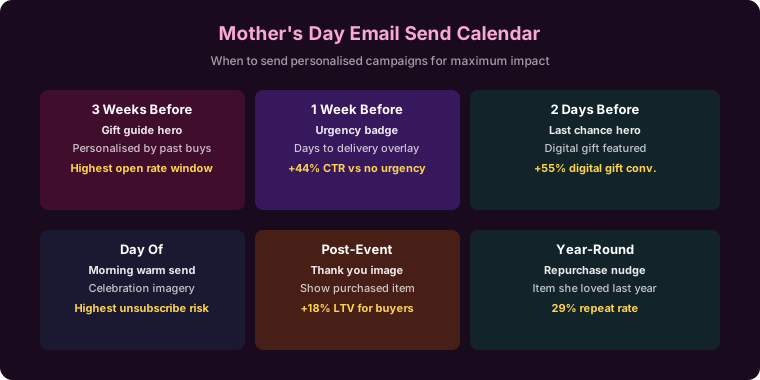
A well-planned Mother’s Day email programme starts three weeks before the holiday and extends through a post-holiday follow-up. Each phase has different purchase intent dynamics and different personalisation opportunities.
Gift Inspiration (Three Weeks Before)
Launch your Mother’s Day programme with personalised gift inspiration. “Sarah, Mother’s Day gift ideas she’ll love” with curated product imagery sets the gifting frame early and captures the organised early-planners who account for a meaningful share of Mother’s Day revenue. Early campaigns face less inbox competition and give subscribers the time to consider and choose thoughtfully.
This first email should be informational and inspirational rather than promotional — it’s presenting gift ideas, not pushing a sale. The personalised image creates relevance; the content creates purchase intent.
Gift Guide by Budget (Two Weeks Before)
Two weeks out, segment your gift guide by price point. “Sarah, thoughtful gifts at every budget” acknowledges that subscribers have different spending ranges and removes the anxiety of feeling priced out of the occasion. Presenting options across price tiers in a personalised image — with the subscriber’s name in a warm, occasion-specific design — makes the gift-buying process feel curated and personal.
For brands with a wide product range, this is also a natural moment to introduce personalisation by purchase category. A subscriber who has bought beauty products sees a beauty-focused gift guide. A subscriber who bought homewares sees a home-focused gift guide.
Sale Launch (Ten Days Before)
Launch Mother’s Day promotions with personalised campaign imagery. “Sarah, Mother’s Day savings are here” alongside your promotional offer creates a personal announcement that feels like a direct communication rather than a broadcast sale.
The sale launch email is typically the highest-volume send in the Mother’s Day sequence. Personalised imagery at this volume makes the most compelling case for personalisation ROI — even a modest CTR lift across a large send produces significant revenue impact.
Shipping Deadline Alert (Five to Seven Days Before)
The shipping cutoff is the single highest-urgency moment in the Mother’s Day calendar. “Sarah, order by Friday for Mother’s Day delivery” creates deadline-driven urgency grounded in a real, personally relevant constraint: the subscriber wants the gift to arrive on time.
This email typically produces the highest conversion rate in the Mother’s Day sequence because the urgency is genuine. A personalised image at this moment — with the subscriber’s name and clear shipping deadline messaging — creates a compelling, personal call to action.
Last-Minute Solutions (Two to Three Days Before)
For brands with expedited shipping, gift cards, or digital products, a last-minute send captures the procrastinators who still haven’t bought. “Sarah, still time for the perfect Mother’s Day gift” with same-day, next-day, or digital gift options creates a final purchase opportunity for the high-intent subscribers who haven’t yet converted.
This email should lead with delivery-certainty messaging — “guaranteed before Sunday” — in the personalised image, since that’s the primary concern for last-minute gift buyers.
Self-Care Follow-Up (Day After)
A post-Mother’s Day send extends the campaign and captures a different purchase motivation. “Sarah, you deserve something too” shifts the frame from gifting to self-purchasing. This acknowledges the subscriber as both a gift-giver and a potential gift-recipient, capturing the self-care and self-treat momentum that often follows gift-giving holidays.
This email performs particularly well for beauty, wellness, and lifestyle brands whose subscribers are both gift-givers for others and buyers for themselves.
Sensitivity and Opt-Out Best Practices
Mother’s Day is emotionally sensitive for a meaningful portion of your subscriber base — those who have lost their mother, those who have experienced pregnancy loss, those who have complicated family relationships, and those who simply find the volume of Mother’s Day marketing overwhelming. The brands that handle this best offer subscribers an easy opt-out from Mother’s Day emails specifically.
Two to three weeks before Mother’s Day, send a preference email: “Sarah, would you prefer to skip our Mother’s Day emails?” with a single-click opt-out. This thoughtful approach consistently produces positive brand responses, reduces unsubscribes during the campaign period, and builds genuine trust with subscribers who choose to opt out. It’s one of the highest-ROI brand-building emails you can send during a major gifting holiday.
Industry-Specific Mother’s Day Personalisation Strategies
Beauty and skincare brands: Spa-themed personalised gift sets, self-care bundles, and skincare gift guides are natural Mother’s Day products. Personalisation by the subscriber’s own product preferences (her favourite category) creates a “curated for her” gifting experience. For the full beauty strategy, see our guide to beauty brand email personalisation.
Jewellery brands: Sentimental, personalised, and meaningful pieces are core Mother’s Day jewellery gifting drivers. Personalised images that create a sense of occasion and permanence — “Sarah, give her something she’ll treasure” — align with the emotional register of jewellery gifting. For the full jewellery strategy, see our guide to jewellery brand email personalisation.
Food and beverage brands: Brunch kits, gourmet hampers, premium chocolate, and champagne are high-conversion Mother’s Day gift categories. Personalised gift guide imagery with the subscriber’s name in a warm, celebratory design creates a compelling gifting prompt. For the full food strategy, see our guide to food brand email personalisation.
Home and lifestyle brands: Home comfort gifts — candles, diffusers, premium towels, personalised homeware — are strong Mother’s Day performers. Personalised gift curation by the subscriber’s own home product preferences creates relevant recommendations. For the full home strategy, see our guide to home brand email personalisation.
Cart Abandonment During Mother’s Day
Gift-shopping cart abandonment often happens when the shopper is uncertain about the gift choice — they’ve added something they like but aren’t sure their recipient will. A personalised recovery image with reassuring messaging addresses this specific hesitation: “Sarah, great choice — mum will love it” builds gift-giving confidence alongside the recovery prompt.
As the holiday approaches, recovery emails can also reference the shipping deadline to add natural urgency: “Sarah, order today for guaranteed Mother’s Day delivery.” For the full cart recovery strategy, see our guide to cart abandonment emails with personalised images.
Setting Up Mother’s Day Personalised Images with Driphue
Design your Mother’s Day image templates in Canva using your brand’s Mother’s Day visual identity — warm, celebratory, and occasion-appropriate. Create templates for each phase of the sequence: inspiration, gift guide, sale launch, shipping deadline, last-minute, and follow-up. Each template should include a prominent first-name layer.
Import each Canva template via Driphue’s Canva integration. Mark the name text layer as dynamic and assign the parameter name. Append your ESP’s merge tag — for Klaviyo: ?name={{ first_name }}. The full ESP syntax for all major platforms is in our ESP personalisation guide.
Real Results from Mother’s Day Campaigns
Gift retailer — 49% Mother’s Day revenue lift: Personalised Mother’s Day images across a five-email sequence increased holiday email-attributed revenue by 49% compared to the previous year’s generic Mother’s Day campaign.
Spa brand — 3.1x gift set sales: Personalised gift guide images with subscriber names tripled gift set purchases from email compared to the previous year’s generic Mother’s Day promotion, with the shipping deadline email producing the highest individual conversion rate in the sequence.
Beauty brand — 37% higher opt-out-programme engagement: Implementing an opt-out preference email before Mother’s Day reduced campaign unsubscribes by 37% and produced measurably positive sentiment responses from subscribers who appreciated the thoughtful approach.
Start Planning Your Mother’s Day Campaign
Mother’s Day combines emotional significance with gifting urgency — making it one of the strongest occasions for personalised email imagery. Start planning three weeks before the holiday, implement the opt-out preference email, and carry personalised imagery through the full six-email sequence.
For broader seasonal strategy, see our holiday email marketing guide and our guide to Valentine’s Day email personalisation for a comparable gifting holiday strategy.
Keep reading
More from the blog
 Marketing Strategy
Birthday and Anniversary Email Campaigns: Personalized Images That Drive Repeat Purchases
9 min read Marketing Strategy
Black Friday Email Marketing with Personalized Images and Countdown Timers
10 min read Marketing Strategy
Dynamic Countdown Timers in Emails: How to Create Urgency That Actually Converts
6 min read
Personalise every image in your emails
Turn your Klaviyo, Brevo or any-ESP campaigns into dynamic, per-subscriber images and countdown timers — no code required.