Valentine's Day Email Campaigns with Personalized Images: Romance Your Revenue

Why Valentine’s Day Emails Need Personalisation
Valentine’s Day is one of the highest-revenue email marketing opportunities of the year. Whether your customers are buying gifts for partners, treating themselves, or celebrating with friends, the emotional nature of the holiday makes it perfectly suited for personalised email imagery. Generic Valentine’s promotions get lost among the hundreds of red-and-pink emails flooding inboxes in early February. Personalised images — “Sarah, find the perfect gift” or “Sarah, treat yourself this Valentine’s Day” — cut through the noise by addressing each subscriber individually at a moment when personal attention genuinely lands.
This guide covers the complete Valentine’s Day email campaign sequence, personalisation strategies for different audience segments, industry-specific tactics, and how to set up personalised Valentine’s imagery with Driphue.
The Valentine’s Day Email Campaign Sequence
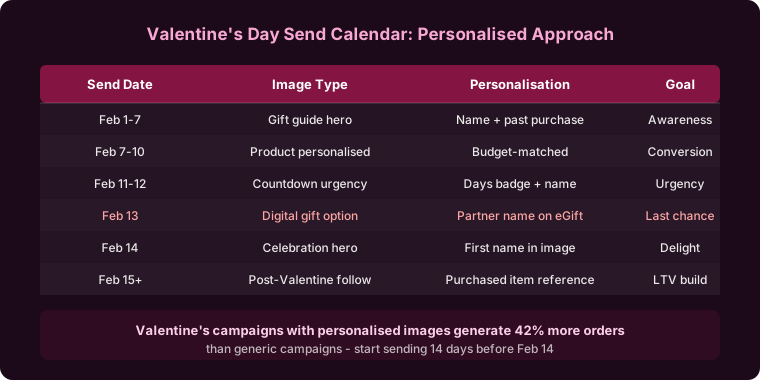
A well-planned Valentine’s Day programme starts two weeks before the 14th and extends through a post-holiday follow-up. The key structural principle is that urgency increases as the holiday approaches — each email in the sequence has a slightly more pressing reason to act.
Early Teaser (Two Weeks Before)
Start building anticipation and capturing the early planners. “Sarah, something special is coming” with a warm, romantic visual tease of the Valentine’s collection primes subscribers and ensures your brand is in their consideration set when they start gift shopping. Early teasers face minimal inbox competition and convert organised gift-buyers who want to shop before the last-minute rush.
This email doesn’t need a promotion — it’s about creating anticipation and establishing your brand as the Valentine’s destination. The personalised image is the primary engagement hook.
Gift Guide Launch (Ten Days Before)
Send personalised gift guide imagery at the moment when most shoppers are beginning their Valentine’s research. “Sarah’s Valentine’s gift guide” with curated product selections creates a personally addressed curation that feels thoughtful rather than promotional.
Segment your gift guide by recipient type and create separate personalised templates for each: gifts for her, gifts for him, gifts for anyone. Your ESP’s segmentation logic routes each subscriber to the appropriate template based on their purchase history, stated preferences, or demographic data. The first-name personalisation applies identically across all templates; only the product imagery changes.
Sale Launch (Seven Days Before)
Launch your Valentine’s promotion with personalised campaign imagery. “Sarah, your Valentine’s deals are live” alongside your promotional offer and a clear shipping deadline creates a personal announcement at the moment of highest Valentine’s purchase intent. Seven days before Valentine’s Day is the peak shopping period for most gift categories — this is typically the highest-revenue send in the sequence.
Shipping Deadline Alert (Three to Four Days Before)
The shipping deadline is the single most powerful urgency driver in any gifting holiday campaign. “Sarah, last day for guaranteed Valentine’s delivery” in a personalised image with the specific shipping cutoff date creates deadline-driven urgency grounded in a real, personally relevant constraint: the subscriber wants the gift to arrive before Valentine’s Day.
This email consistently produces the highest conversion rate in the Valentine’s sequence because the deadline is genuine and the consequence of missing it is clear. Lead with the delivery guarantee in the personalised image — “guaranteed by February 14th if you order today” — to make the urgency concrete.
Last-Minute Digital Options (Day Before / Valentine’s Day)
For brands with digital products, gift cards, or instant-delivery options, a day-before or day-of email captures the last-minute shoppers who missed the shipping window. “Sarah, it’s not too late — instant gift options” with personalised imagery provides a solution for procrastinators and creates a final revenue opportunity with zero delivery risk.
Post-Valentine’s Self-Care (Day After)
Extend the campaign with a self-purchasing angle. “Sarah, you deserve something special too” shifts the frame from gifting-for-others to self-care and self-treat, capturing the post-holiday self-gifting momentum that follows most gift-giving occasions. This email performs particularly well for beauty, wellness, and lifestyle brands whose subscribers are both gift-givers and self-purchasers.
Personalisation Strategies by Audience Segment
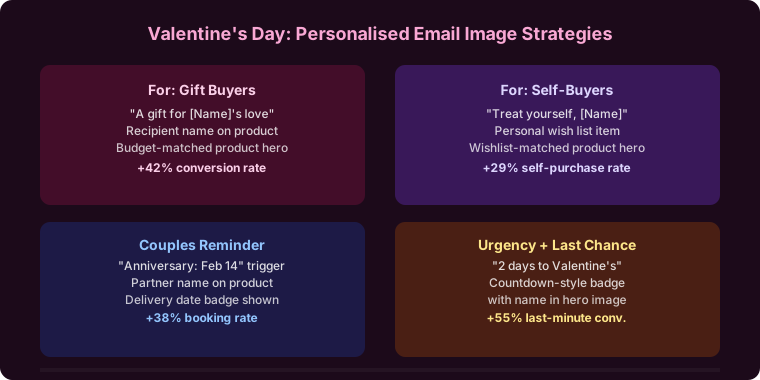
Gift buyers: The majority of Valentine’s Day email recipients are buying gifts for partners, family members, or friends. Frame personalised images around giving: “Sarah, make their day” with curated product suggestions segmented by recipient type and price point. The personal touch in the image makes the gift-finding process feel guided and individual.
Self-purchasers: A significant share of Valentine’s Day spending is self-gifting — particularly in beauty, fashion, and wellness categories. Frame personalised images around self-love and self-care: “Sarah, treat yourself” with indulgent product imagery. Brands that acknowledge this segment explicitly consistently outperform those that only address gift-buyers.
Singles and non-celebrators: Not all subscribers celebrate Valentine’s Day romantically, and many actively dislike the commercial pressure of the holiday. Consider offering a preference opt-out, as with Mother’s Day, or framing your campaign more broadly around love, friendship, and self-appreciation rather than exclusively romantic gifting. This inclusive framing consistently produces better engagement across the full list than narrowly romantic messaging.
Industry-Specific Valentine’s Personalisation
Jewellery brands: Personalised Valentine’s jewellery imagery — “Sarah, give her something she’ll treasure” — positions the purchase as a meaningful, lasting expression rather than a transactional gift. For the full jewellery strategy, see our guide to jewellery brand email personalisation.
Beauty and skincare brands: Both gifting and self-care positioning work for Valentine’s in beauty. Personalised gift set imagery alongside personalised self-treat imagery give you two campaign angles with the same personalisation infrastructure. For the full beauty strategy, see our guide to beauty brand email personalisation.
Food and beverage brands: Chocolates, champagne, gourmet hampers, and restaurant vouchers are classic Valentine’s categories. Personalised gift guide imagery with warm, celebratory design creates compelling gifting prompts. For the full food strategy, see our guide to food brand email personalisation.
Fashion brands: Valentine’s occasion-dressing — date night outfits, romantic accessories — creates natural personalisation opportunities. “Sarah, dress for the occasion” segmented by gender and style preference produces highly relevant Valentine’s imagery. For the full fashion strategy, see our guide to fashion brand email personalisation.
Cart Abandonment During Valentine’s
Valentine’s cart abandonment typically happens when shoppers are uncertain about gift choice — they’ve added something they like but aren’t confident their recipient will. A personalised recovery image with reassuring messaging addresses this specific hesitation: “Sarah, great choice — they’ll love it” builds gift-giving confidence alongside the recovery prompt.
As the holiday approaches, recovery imagery can reference the shipping deadline for natural, deadline-based urgency: “Sarah, order today for guaranteed Valentine’s Day delivery.” For the full cart recovery strategy, see our guide to cart abandonment emails with personalised images.
Setting Up Valentine’s Personalised Images with Driphue
Create your Valentine’s image templates in Canva using your brand’s Valentine’s visual identity — warm, romantic, and occasion-appropriate without being generic. Design templates for each phase of the sequence: teaser, gift guide (one per segment), sale launch, shipping deadline, and post-holiday. Each template should include a prominent first-name layer.
Import each Canva template via Driphue’s Canva integration. Mark the name text layer as dynamic, append your ESP’s merge tag — for Klaviyo: ?name={{ first_name }} — and embed in your campaign. The full ESP syntax is in our ESP personalisation guide.
Real Results from Valentine’s Day Personalisation
Jewellery brand — 54% Valentine’s revenue lift: Personalised Valentine’s images with subscriber names across a five-email sequence increased Valentine’s Day email-attributed revenue by 54% compared to the previous year’s generic campaign.
Chocolate brand — 3.7x gift guide CTR: Personalised gift guide header images achieved 3.7x the click-through rate of their previous generic gift guide send, with the personalised “Sarah’s Valentine’s gift guide” header image driving the majority of the lift.
Flower delivery brand — 41% higher conversion rate: Personalised Valentine’s campaign images converted 41% more subscribers into purchasers compared to the previous year’s generic Valentine’s campaign, with the shipping deadline email producing the highest individual conversion rate in the sequence.
Start Planning Your Valentine’s Campaign
Valentine’s Day rewards brands that plan ahead, segment their audience thoughtfully, and personalise at every stage of the campaign sequence. Start building your templates two to three weeks before the holiday, launch the teaser early, and carry personalised imagery through to the post-holiday self-care follow-up.
For broader seasonal strategy, see our holiday email marketing guide and our guide to Mother’s Day email personalisation for a comparable gifting holiday approach.
Keep reading
More from the blog
 Marketing Strategy
Birthday and Anniversary Email Campaigns: Personalized Images That Drive Repeat Purchases
9 min read Marketing Strategy
Black Friday Email Marketing with Personalized Images and Countdown Timers
10 min read Marketing Strategy
Dynamic Countdown Timers in Emails: How to Create Urgency That Actually Converts
6 min read
Personalise every image in your emails
Turn your Klaviyo, Brevo or any-ESP campaigns into dynamic, per-subscriber images and countdown timers — no code required.