Email Image Customisation vs Personalisation: What Marketers Actually Need
The Terminology Confusion
Marketers use "customisation" and "personalisation" interchangeably when describing email image strategies. This creates real problems: it leads to buying the wrong tools, setting the wrong expectations, and misunderstanding what is actually possible with your email images.
The distinction is not academic. Each approach uses different data, different technology, and produces fundamentally different subscriber experiences. If you are investing in email image strategy, understanding this difference determines whether you get meaningful results or waste your budget. For the broader landscape of email image personalisation, see our complete guide.
What Is Email Image Customisation?
Customisation means creating image variations for predefined groups or segments. You design multiple versions of an image and assign them based on subscriber attributes like location, purchase category, gender, or lifecycle stage.
A fashion brand might create three hero banners: one featuring menswear for male subscribers, one featuring womenswear for female subscribers, and a unisex version for everyone else. The subscriber does not get a unique image. They get one of three pre-made options based on their segment.
Customisation typically uses conditional logic in your ESP: if subscriber attribute equals X, show image version A. It works within existing ESP capabilities without external tools.
What Is Email Image Personalisation?
Personalisation renders a unique image for each individual subscriber using their specific data. Instead of choosing from pre-made variations, the image server dynamically generates a visual that incorporates the subscriber's actual name, location, points balance, purchase history, or other individual data.
When Sarah from London opens her email, she sees a banner that says "Sarah, your 2,450 points are waiting in London." When James from Manchester opens the same campaign, he sees "James, your 890 points are waiting in Manchester." Each image is generated uniquely.
This approach requires an image personalisation tool like Driphue that sits between your design tool and your ESP. The image URL contains merge tags that pull individual subscriber data to render unique visuals.
Why the Distinction Matters
The practical differences between customisation and personalisation show up in three areas:
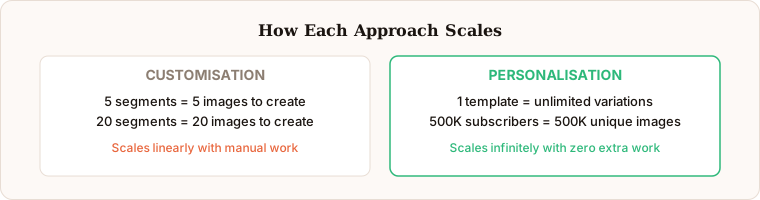
Scale of uniqueness: Customisation produces a handful of variations. Personalisation produces as many unique images as you have subscribers. For a list of 50,000 subscribers, customisation might create 5 versions. Personalisation creates 50,000.
Emotional impact: Seeing your name in an image creates a fundamentally different response than seeing a generic segment-appropriate image. It signals the brand knows you individually, not just your demographic.
Maintenance overhead: Customisation requires designing and managing multiple image variants. As your segments grow more granular, the number of required variants multiplies. Personalisation uses a single template that dynamically adapts, requiring one design regardless of list size.
When Customisation Is Enough
Customisation works well when you have a small number of clearly defined segments and the visual differences between segments are substantial. Product category recommendations, gendered collections, and seasonal regional content are solid customisation use cases.
If you have five customer types and each needs a completely different visual story, designing five separate images is reasonable. The ROI on a personalisation tool may not justify itself if your segmentation is simple and your list is small.
When You Need Personalisation
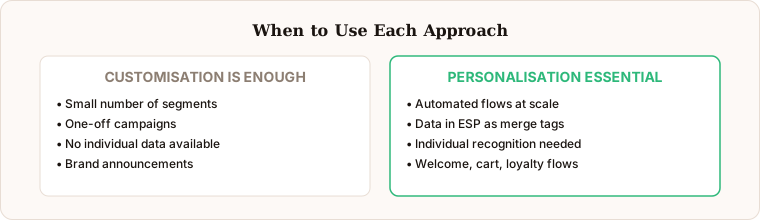
Personalisation becomes essential when individual recognition matters. Welcome emails that address the subscriber by name in the hero image. Cart abandonment showing the specific product left behind. Loyalty programmes displaying actual points balances. These use cases require individual-level data that customisation cannot provide.
Personalisation also wins when you want to scale without multiplying your design workload. One template handles your entire list. Adding a new data point means updating the template once, not creating dozens of new variants.
For most growing e-commerce brands, the sweet spot is starting with personalisation on high-impact flows (welcome, cart recovery, loyalty) while using simple customisation for broad campaign sends.
Moving from Customisation to Personalisation
If you are currently using customised image segments and want to move to personalisation, the transition is straightforward with Driphue:
Step 1: Pick your highest-performing email flow.
Step 2: Design a single template in Canva that uses placeholder text where personalisation will appear.
Step 3: Import into Driphue and map merge tag layers to your ESP data fields.
Step 4: Replace the static or segmented images in your ESP with the personalised Driphue URL.
Driphue supports all major ESPs including Klaviyo, Mailchimp, HubSpot, and 20+ others. The merge tag syntax is handled automatically based on your ESP selection.
For a detailed comparison of personalisation tools to see which fits your workflow best, see our tools comparison.
Keep reading
More from the blog
 Email Personalization
The E-commerce Guide to Email Image Personalisation: From First Image to Full Automation
11 min read Email Personalization
Email Image Personalisation Tools Compared: Driphue vs NiftyImages vs Hyperise vs OKZest
10 min read Email Personalization
Email Image Personalization: The Complete Guide for E-Commerce Brands in 2026
8 min read
Personalise every image in your emails
Turn your Klaviyo, Brevo or any-ESP campaigns into dynamic, per-subscriber images and countdown timers — no code required.