Why Aren't My Dynamic Email Images Updating? A Troubleshooting Guide
The Most Common Reasons Your Dynamic Images Look Stale
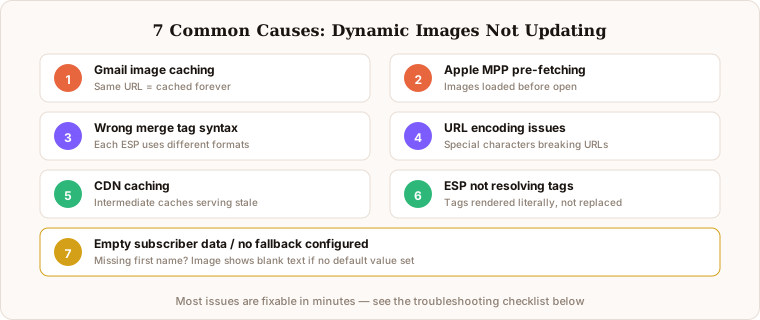
You set up personalised email images, tested them, and everything looked perfect. Then you check an email opened hours later and the image seems frozen, showing old data or not personalising at all. This is one of the most frequently reported issues in email image personalisation, and it almost always has a straightforward explanation.
Before diving into troubleshooting, make sure you understand the basics of how personalised email images work. Our complete guide to email image personalisation covers the fundamentals.
Cause 1: Gmail Image Caching
This is the most common culprit. Gmail routes all email images through its proxy and caches them. When a subscriber re-opens an email, Gmail may serve the cached version instead of making a fresh request to your image server.
How to tell: The image personalisation was correct on the first open but shows stale data on subsequent opens. Testing in non-Gmail clients shows the image updating correctly.
Fix: For personalisation that uses subscriber data in the URL (names, locations, product data), this is not actually a problem. Each subscriber gets a unique URL, and Gmail caches each unique URL separately. The "stale" content only affects data that was meant to change between opens, such as live inventory counts.
Cause 2: Apple Mail Privacy Protection
Apple MPP pre-fetches email images at delivery time, not at the moment the subscriber opens the email. This means any content meant to be "live" at open time is actually frozen at delivery time.
How to tell: The issue only appears for Apple Mail users. The image shows data from when the email was delivered rather than when it was opened.
Fix: Design your personalisation around send-time data. Name, location, product, and loyalty data embedded in the URL at send time works perfectly with MPP. Driphue is built around this approach.
Cause 3: Incorrect Merge Tag Syntax
If your personalised image shows raw merge tags like {{first_name}} instead of the subscriber actual name, the merge tags in your URL are not being resolved by your ESP.
How to tell: The image shows literal merge tag text instead of personalised data.
Fix: Verify that the merge tag format matches your ESP syntax exactly. Different ESPs use different formats: Klaviyo uses double curly braces, Mailchimp uses pipe delimiters, ActiveCampaign uses percent signs. Driphue generates the correct format automatically when you select your ESP.
Cause 4: URL Encoding Issues
Merge tags in URLs sometimes get URL-encoded by the ESP, turning spaces into %20 and special characters into encoded equivalents. If the image server does not handle these correctly, the personalisation may break.
How to tell: The image shows garbled text or partial personalisation data with encoded characters visible.
Fix: Driphue handles URL encoding automatically. If you are using another tool, check whether your image server decodes URL-encoded parameters correctly.
Cause 5: CDN or Browser Caching
Beyond Gmail and Apple Mail, your own CDN or the subscriber browser cache can serve stale images. This is less common for email images but can occur in testing scenarios.
How to tell: The issue appears inconsistently and clears when you force a hard refresh or clear cache.
Fix: In production, this is rarely an issue because each subscriber URL is unique. During testing, clear your browser cache or use incognito mode to verify fresh renders.
Cause 6: ESP Not Resolving Tags in Image URLs
Some ESPs resolve merge tags in the email body text but not in image URL attributes. This is an ESP-specific limitation.
How to tell: Text personalisation in the email body works, but image URLs show unresolved merge tags.
Fix: Check your ESP documentation for whether merge tags are supported in image src attributes. Most modern ESPs support this, but some older platforms may not. Our multi-ESP setup guide covers specifics for popular platforms.
Cause 7: Fallback Data Not Configured
If a subscriber has no first name in your ESP (the field is empty), the merge tag may resolve to blank, leaving an empty space in your image.
How to tell: Some subscribers see correct personalisation while others see blank spaces where their name should be.
Fix: Configure fallback values in your merge tags. Most ESPs support default values, such as "there" or "friend" when first name is empty. Driphue supports fallback text configuration.
Quick Troubleshooting Checklist
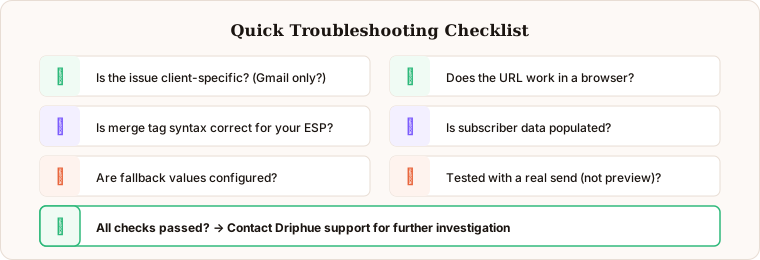
When your dynamic images are not working as expected, work through this sequence: check if the issue is client-specific (Gmail vs Apple Mail vs Outlook), verify merge tag syntax matches your ESP format, test with a subscriber who has complete profile data, check the image URL directly in a browser to confirm the image server is responding, review whether your ESP resolves tags in image URL attributes, and confirm fallback values are set for empty fields.
If you are using Driphue, the preview tool lets you test personalised images with specific data values before sending. This catches most issues before they reach subscribers. For persistent issues, Driphue support can help diagnose the root cause.
Keep reading
More from the blog
 Email Personalization
The E-commerce Guide to Email Image Personalisation: From First Image to Full Automation
11 min read Email Personalization
Email Image Personalisation Tools Compared: Driphue vs NiftyImages vs Hyperise vs OKZest
10 min read Email Personalization
Email Image Personalization: The Complete Guide for E-Commerce Brands in 2026
8 min read
Personalise every image in your emails
Turn your Klaviyo, Brevo or any-ESP campaigns into dynamic, per-subscriber images and countdown timers — no code required.