Purchase History Email Personalization: Turn Past Buyers into Repeat Customers

Why Purchase History Powers the Best Personalisation
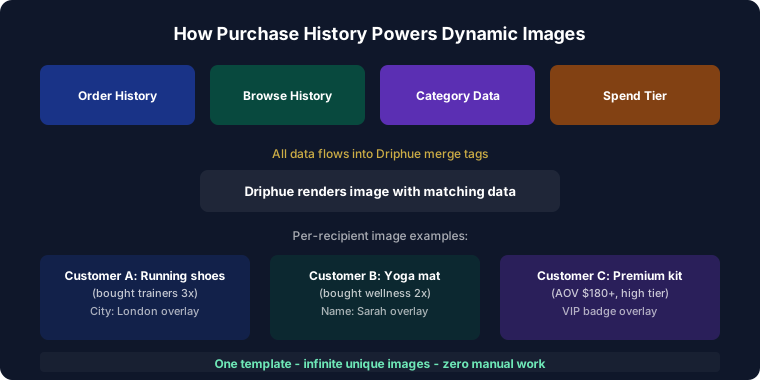
Purchase history is the strongest predictor of future buying behaviour. A customer who bought running shoes is more likely to buy running accessories than someone who bought formal wear. A customer who bought skincare regularly is a strong candidate for a complementary serum. A customer who bought a beginner yoga mat is a natural prospect for a yoga block set six weeks later. Yet most e-commerce brands send the same promotional emails to every subscriber regardless of what they have purchased — a massive missed opportunity that purchase history personalisation directly addresses.
When you personalise email images based on purchase history, every email feels individually curated for the recipient’s actual relationship with the brand. "Sarah, accessories for your new running kit" with relevant product imagery creates the kind of relevance that drives repeat purchases, builds genuine brand loyalty, and increases customer lifetime value over time. This guide covers every major purchase history personalisation strategy, how to connect your data to your ESP, timing best practices, and real results from brands running purchase-data-driven personalisation programmes.
Purchase History Personalisation Strategies
Category-Based Imagery
The most universally applicable purchase history personalisation matches future email imagery to the category of the subscriber’s most recent or most frequent purchases. A subscriber who has bought skincare receives beauty-focused personalised images. A subscriber who has bought kitchen equipment sees culinary-themed imagery. A subscriber who has bought activewear sees fitness-lifestyle visuals.
Category alignment makes every email feel immediately relevant without requiring deep product-level data integration. If your ESP has the subscriber’s last purchase category — which Klaviyo, Omnisend, and most major ESPs capture automatically from e-commerce platform syncs — you can route each subscriber to a category-appropriate Driphue template. The result is a campaign where every subscriber feels like the email was designed for someone who shops the way they shop.
Complementary Product Cross-Selling
After a purchase, personalised images showing complementary products drive high-converting cross-sell sequences. "Sarah, complete your running kit" with products that pair naturally with her recent purchase creates a curation-like experience rather than a promotional blast. The personalised image signals that the recommendation is specific to what Sarah actually owns, not a generic bestseller list.
Cross-sell timing matters: the optimal window is typically three to seven days after confirmed delivery, once the customer has received and ideally used the product. A cross-sell that arrives before delivery feels premature; one that arrives three weeks later has lost the purchase momentum. For the full post-purchase sequence strategy, see our post-purchase guide.
Replenishment Reminders
Consumable products have natural repurchase cycles: skincare routines, supplements, cleaning products, coffee, pet food, baby supplies. Personalised replenishment reminder images timed to the average consumption window for each product category — "Sarah, time to restock your vitamin C serum" arriving 28 days after a 30-day supply purchase — drive predictable repeat revenue with high open and conversion rates because the email arrives precisely when the subscriber is experiencing the natural need.
Pair replenishment reminders with a personalised offer deadline ("Sarah, your 15% reorder discount expires Friday") to create both relevance and urgency. The combination of "this is for you specifically" and "this offer ends on a specific date" consistently produces the highest conversion rates in the replenishment category. Personalise both the product name and the deadline date in the hero image for maximum impact.
Upgrade and Next-Level Recommendations
Customers naturally progress along product journeys: from entry-level to premium, from single products to bundles, from starter kits to full systems. Personalised images showing the logical next step for each subscriber’s current product ownership — "Sarah, ready to upgrade to the pro kit?" — guide customers through their journey with the brand rather than treating every email as a standalone promotion.
Upgrade personalisation requires knowing both what the subscriber currently owns and what the natural next product is. For brands with linear product progressions (fitness programmes, skincare regimens, software tiers), this mapping is straightforward. For brands with broader catalogues, purchase category and frequency data can proxy for progression stage even without explicit product journey mapping.
Spend-Tier and Loyalty Recognition
Personalise based on customer lifetime value to reflect the subscriber’s actual relationship stage with the brand. High-spend customers see VIP-tier imagery with exclusive access framing: "Sarah, as one of our top customers, your early access is live." Medium-spend customers see value-and-reward imagery designed to encourage their next tier. First-time buyers see second-purchase encouragement: "Sarah, loved your first order? Here’s what’s next."
Spend-tier personalisation does two things simultaneously: it makes high-value customers feel recognised and appreciated (building retention), and it creates a visible reward pathway for mid-tier customers that incentivises additional spend.
Lapsed Buyer Re-Engagement
Customers who have purchased before but have not bought in 90, 180, or 365 days respond differently to re-engagement than subscribers who have never purchased. "Sarah, it’s been a while — here’s what’s new in [her purchase category]" with category-matched imagery acknowledges the prior relationship and presents new products relevant to her established preferences. This is more effective than generic re-engagement messaging because it references what the subscriber actually liked about the brand. For the full re-engagement strategy, see our win-back guide.
Connecting Purchase Data to Your ESP
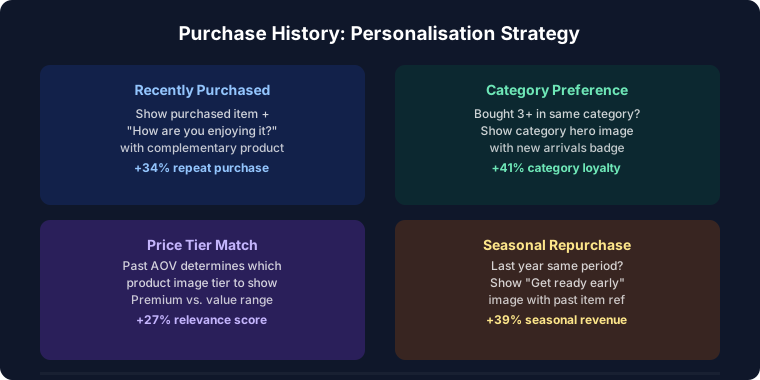
Purchase history personalisation requires your e-commerce platform to sync transaction data to your ESP. Shopify and WooCommerce both sync rich purchase data — product names, categories, order values, purchase dates — to ESPs like Klaviyo, Omnisend, and Drip automatically once the integration is configured. This data is then available as personalisation fields in your ESP and can be passed to Driphue image URLs as parameters.
The most commonly used purchase data parameters for Driphue personalisation are: subscriber first name (always), last purchase category (for template routing), last product name (for cross-sell and replenishment copy in the image), and customer tier (for VIP vs standard template routing). You do not need all of these at once — start with name and last purchase category, which are available in virtually every e-commerce ESP integration, and add parameters progressively as your templates become more sophisticated.
Timing Purchase-Based Emails
The timing of purchase-based personalised emails is as important as the personalisation itself. The right message at the wrong moment produces poor results regardless of how well the image is personalised. Cross-sell emails perform best three to seven days after confirmed delivery. Replenishment reminders should be timed to arrive two to three days before the expected reorder moment. Review request emails perform best seven to fourteen days post-delivery once the customer has had time to use the product. Lapsed buyer re-engagement typically begins at 90 days post-purchase for subscription-adjacent brands and at 180 days for higher-consideration categories.
Avoiding Over-Personalisation
Purchase history personalisation should feel helpful and curated, not tracked and monitored. The distinction lies in the framing: category-level personalisation ("Sarah, new arrivals in running gear") feels like a brand that knows your interests. Transaction-level data made explicit ("Sarah, based on your purchase of Nike Air Zoom Pegasus 40 in Size 8 on March 12th") feels like surveillance. Use purchase history to inform imagery and category framing; avoid surfacing the data mechanics to the subscriber directly. For more on balancing personalisation with privacy, see our first-party data guide.
Real Results from Purchase History Personalisation
Multi-category retailer — 52% higher repeat purchase rate: Purchase history-based personalised images, routing each subscriber to category-appropriate templates across weekly campaigns, increased repeat purchase rates by 52% compared to the previous undifferentiated promotional programme.
Supplement brand — 3.6x replenishment revenue: Personalised replenishment reminder images with the subscriber’s name, the specific product they previously purchased, and a named offer deadline generated 3.6x more reorder revenue than the brand’s previous generic replenishment reminder emails.
Fashion brand — 41% cross-sell conversion rate improvement: Category-matched personalised cross-sell images deployed three to five days post-delivery converted 41% more post-purchase subscribers into repeat buyers compared to a static post-purchase cross-sell email with generic product imagery.
Start Personalising with Purchase History
Your purchase data is your most valuable personalisation asset for driving repeat business. It tells you what subscribers actually like, what they have already bought, and what they are most likely to buy next — information that makes every email more relevant and every campaign more profitable.
For the complete personalisation strategy, see our email personalisation guide. For the data collection approach that complements purchase history, see our zero-party data guide. Start your free Driphue trial and turn purchase history into personalised email experiences that drive repeat business and lasting loyalty.
Keep reading
More from the blog
 Marketing Strategy
Birthday and Anniversary Email Campaigns: Personalized Images That Drive Repeat Purchases
9 min read Marketing Strategy
Black Friday Email Marketing with Personalized Images and Countdown Timers
10 min read Marketing Strategy
Dynamic Countdown Timers in Emails: How to Create Urgency That Actually Converts
6 min read
Personalise every image in your emails
Turn your Klaviyo, Brevo or any-ESP campaigns into dynamic, per-subscriber images and countdown timers — no code required.