Hyperise Alternative: Simpler Email Image Personalisation for E-commerce
Why E-commerce Brands Look for Hyperise Alternatives
Hyperise positions itself as a multi-channel personalisation platform covering email, websites, video, and ads. It is a broad tool designed for teams that want personalisation across every touchpoint. But for e-commerce brands whose primary need is personalised email images, that breadth comes with complexity and cost that may not be justified by the actual use case.
The most common reasons e-commerce marketers evaluate Hyperise alternatives include the following.
Feature overload. Hyperise offers website personalisation, video personalisation, and email image personalisation within a single platform. If you only need email images, you are paying for and navigating features you will not use. The onboarding and learning curve reflects the full platform scope, not just the email image feature.
Design workflow friction. Hyperise has its own image editor for creating personalised templates. For teams already working in Canva — which describes the majority of e-commerce marketing teams — this means learning another editor and maintaining designs in two separate tools. Any design change means going back into the Hyperise editor rather than updating the Canva file your team already manages.
Pricing for unused features. Hyperise pricing reflects its multi-channel scope. E-commerce brands focused exclusively on email personalisation often find more cost-effective options that do one thing well, without paying for website and video personalisation they have no intention of using.
For the broader context on email image personalisation and how it works, see our complete guide to email image personalisation for e-commerce.
Driphue vs Hyperise: Feature Comparison
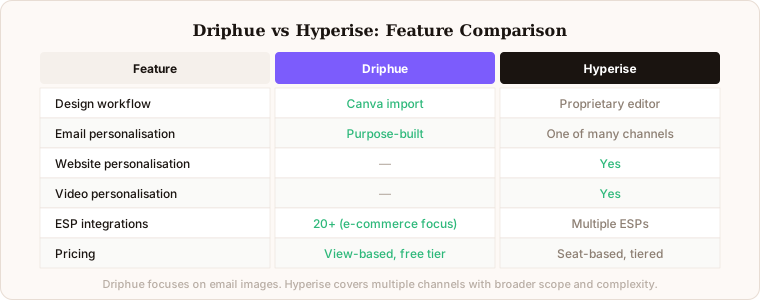
Email image personalisation: Both platforms support merge tag-based personalisation for email. Hyperise offers this as one channel among many. Driphue is purpose-built for email image personalisation, meaning the entire product experience — design import, parameter configuration, ESP integration, URL generation — is optimised for this single use case.
Design workflow: Hyperise uses a proprietary image editor. Driphue lets you import designs directly from Canva. For e-commerce teams that already design in Canva, this eliminates the friction of maintaining designs in two tools and learning a second editor. Changes are made in Canva and re-imported; there is no parallel design system to manage.
Canva integration: Driphue’s native Canva integration means you design in your existing workflow and import with a single click. Your design assets live in Canva where your team can manage, update, and version them. Hyperise does not offer native Canva import.
Website personalisation: Hyperise includes dynamic website personalisation. Driphue focuses exclusively on email. If personalised website images are a core requirement alongside email, Hyperise has functionality here that Driphue does not.
Video personalisation: Hyperise supports personalised video thumbnails for outbound sales use cases. Driphue does not. If personalised video is a core requirement, Hyperise is the better choice.
ESP compatibility: Both platforms work with major ESPs. Driphue has focused integration documentation for e-commerce-first platforms including Klaviyo, Omnisend, and 20+ other ESPs, with syntax guides specific to each platform’s merge tag format.
Pricing model: Driphue pricing is based on image views with clear tiers — you pay for what you use. Hyperise pricing is seat-based with tiered feature access. For e-commerce brands with large subscriber lists and high email volumes, the view-based model often produces a more predictable cost structure.
Who Should Choose Driphue Over Hyperise
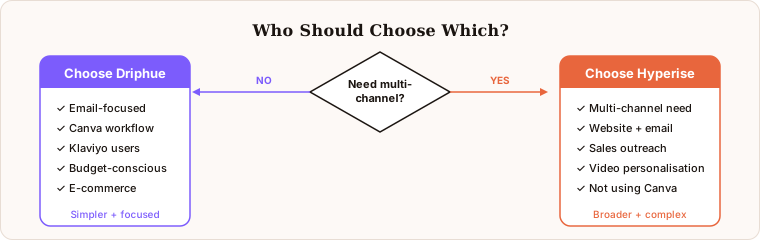
E-commerce brands focused on email personalisation. If your primary personalisation channel is email and your team designs in Canva, Driphue is a more focused, more efficient, and typically more cost-effective tool. There is no multi-channel complexity to navigate and no secondary editor to learn.
Teams that want simplicity and speed. Driphue does one thing well: personalised email images. The workflow is intentionally streamlined. Import your Canva design, mark your name layer as dynamic, append your ESP’s merge tag to the URL, embed in your campaign. Most users are live in under 30 minutes.
Klaviyo-first e-commerce teams. Driphue’s Klaviyo integration is built specifically for e-commerce workflows. Setting up personalised images in your Klaviyo flows — welcome series, cart abandonment, post-purchase — takes minutes, with full documentation for every flow type. For the full setup guide, see our Klaviyo personalised images guide.
Budget-conscious teams without multi-channel needs. If you do not need website and video personalisation, Driphue gives you best-in-class email image personalisation at a lower price point than a multi-channel platform. You are paying for the capability you will actually use.
Teams already using Canva. The Canva-native workflow is the single most significant practical advantage for teams that already design in Canva. No duplicate design management, no learning a new editor, no friction between your existing design process and your email personalisation tool.
Who Should Stick with Hyperise
Genuine multi-channel personalisation needs. If you need personalised images across email, website, and video simultaneously, Hyperise’s multi-channel architecture has clear value. The platform is designed for this cross-channel use case in a way that Driphue is not.
Sales-focused outbound personalisation. Hyperise has strong positioning in outbound sales personalisation with LinkedIn integration and landing page personalisation. If your primary use case is personalised sales outreach rather than e-commerce marketing email, Hyperise may be a better fit for the specific workflow.
Teams not using Canva. If your team designs in another tool and has no existing Canva workflow, the Canva import advantage of Driphue is less relevant. The choice then comes down to feature scope and pricing rather than workflow compatibility.
How Driphue Compares to Other Tools
Hyperise is not the only comparison point for e-commerce brands evaluating email image personalisation tools. NiftyImages is another commonly evaluated alternative with a different approach to personalised image creation and pricing. For a three-way comparison that covers NiftyImages, Hyperise, and Driphue side by side across features, workflow, pricing, and e-commerce fit, see our NiftyImages vs Hyperise vs Driphue comparison.
For a focused comparison with Hyperise specifically covering the e-commerce use case in more depth, see our guide to Hyperise vs Driphue for e-commerce.
Making the Switch from Hyperise to Driphue
Migrating from Hyperise to Driphue is straightforward because personalised image URLs are standard image sources in your email templates. The migration process is: import your designs into Driphue from Canva, configure the personalisation parameters, generate new Driphue URLs, and replace the existing Hyperise image URLs in your email templates.
There is no subscriber data migration. Your subscriber data stays in your ESP. Your template logic and flow structure stays in your ESP. You are replacing the image source URLs only — a single find-and-replace operation in each relevant email template. Most migrations are complete in an afternoon.
For e-commerce brands migrating a Klaviyo programme, start with your highest-impact flows: welcome series, cart abandonment, and post-purchase. Replace the Hyperise URLs in these three flows first, and you will immediately see the impact of Driphue’s Canva-native workflow. For a broader comparison of the full landscape of email personalisation tools, see our email personalisation tools comparison.
Keep reading
More from the blog
 Email Personalization
The E-commerce Guide to Email Image Personalisation: From First Image to Full Automation
11 min read Email Personalization
Email Image Personalisation Tools Compared: Driphue vs NiftyImages vs Hyperise vs OKZest
10 min read Email Personalization
Email Image Personalization: The Complete Guide for E-Commerce Brands in 2026
8 min read
Personalise every image in your emails
Turn your Klaviyo, Brevo or any-ESP campaigns into dynamic, per-subscriber images and countdown timers — no code required.