GDPR and Email Image Personalization: Compliance Guide for E-commerce

Personalization and Privacy Can Coexist
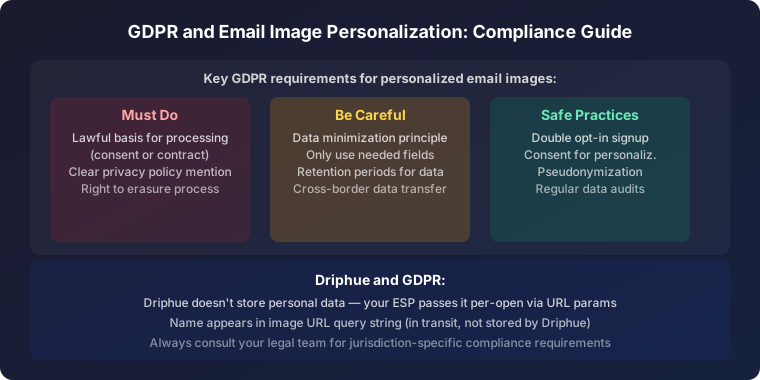
E-commerce brands sometimes hesitate to adopt email image personalization because of data privacy concerns. The good news is that personalized email images are fully compatible with GDPR, CCPA, and other privacy regulations when implemented correctly. Understanding the compliance requirements gives you confidence to personalize without risk.
This guide covers the key privacy considerations for email image personalization and provides practical compliance steps for e-commerce brands.
What Data Does Email Image Personalization Use?
Most email image personalization relies on basic subscriber data that brands already collect and use for email marketing: first names, locations, and basic account information. This data is already present in your ESP and already subject to your existing privacy policies and consent mechanisms.
Driphue does not collect additional data from subscribers. The personalization data flows from your ESP to Driphue’s image rendering engine through URL parameters at the moment of email open. Driphue renders the image and delivers it — the subscriber data exists only in the image URL that your ESP generates.
GDPR Compliance for Personalized Images
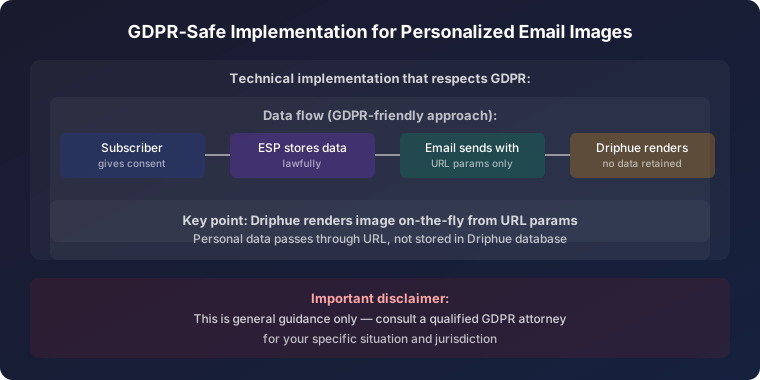
Lawful Basis for Processing
Under GDPR, you need a lawful basis for processing personal data. For email marketing personalization, the two most common bases are consent (the subscriber opted in to receive marketing emails) and legitimate interest (personalization improves the subscriber’s email experience). Most e-commerce brands already have consent-based email programs that cover personalization as part of the marketing email experience.
Data Minimization
GDPR’s data minimization principle requires using only the data necessary for the purpose. Email image personalization typically uses minimal data — a first name and occasionally a city or state. This is inherently privacy-friendly because it uses data the subscriber has already shared for email communication.
Transparency
Your privacy policy should clearly explain how you use subscriber data in email marketing, including personalization. A simple addition to your privacy policy noting that subscriber names and preferences may be used to personalize email content and images satisfies this requirement.
Data Subject Rights
Subscribers have the right to access, correct, and delete their personal data. Since personalized images are generated dynamically from ESP data, honoring these rights is straightforward — updating or deleting data in your ESP automatically affects future personalized images.
CCPA Compliance
Under CCPA, California consumers have the right to know what personal information is collected and how it’s used, and the right to opt out of the sale of personal information. Email image personalization does not constitute selling data — subscriber data remains within your email marketing ecosystem. Ensure your privacy disclosures mention personalization as part of your email marketing practices.
Best Practices for Privacy-Friendly Personalization
Use only voluntarily provided data: Base personalization on data subscribers have explicitly provided through signup forms, account profiles, or purchase history. Avoid using inferred or third-party data for image personalization.
Provide value through personalization: Use personalization to improve the subscriber’s experience, not to demonstrate surveillance. Personalized welcome images, birthday campaigns, and relevant product recommendations provide genuine value.
Implement fallback handling: Design personalized images with graceful fallbacks when data is missing. Driphue automatically renders default content when personalization parameters are empty, ensuring a clean experience for subscribers who have limited data on file.
Respect unsubscribe preferences: When subscribers opt out of marketing emails, all personalized email images stop immediately since they’re delivered through your ESP’s standard email sending process.
Data Processing with Driphue
Driphue processes subscriber data only at the moment of image rendering. The platform does not store subscriber personal data after rendering the personalized image. This minimal data handling approach simplifies compliance — Driphue acts as a data processor under GDPR, processing data only as directed by your instructions through the image URL parameters.
Privacy-Friendly Personalization Strategies
First-name personalization is the most privacy-friendly form of image personalization and also one of the most impactful. It uses minimal data, provides clear subscriber value, and drives significant engagement improvements. For strategies, see our personalization guide.
Location-based personalization using city or region names is appropriate when the data was voluntarily provided through signup forms or account profiles. Avoid IP-geolocation-based personalization in jurisdictions with strict consent requirements.
Real-World Compliance in Action
EU-Based Fashion Brand: Implemented Driphue personalized images across their Klaviyo email program while maintaining full GDPR compliance. Their Data Protection Officer confirmed that first-name image personalization falls within their existing consent framework for email marketing.
US Health Brand: Added personalized images to their email marketing with updated privacy disclosures covering personalization. Zero privacy complaints from subscribers despite significant personalization across welcome, cart recovery, and promotional campaigns.
Start Personalizing with Confidence
Email image personalization is privacy-friendly by design when you use voluntarily provided subscriber data and follow standard email marketing compliance practices. For the complete personalization strategy, explore our email image personalization guide. Start your free Driphue trial and personalize with confidence.
Keep reading
More from the blog
 Marketing Strategy
Birthday and Anniversary Email Campaigns: Personalized Images That Drive Repeat Purchases
9 min read Marketing Strategy
Black Friday Email Marketing with Personalized Images and Countdown Timers
10 min read Marketing Strategy
Dynamic Countdown Timers in Emails: How to Create Urgency That Actually Converts
6 min read
Personalise every image in your emails
Turn your Klaviyo, Brevo or any-ESP campaigns into dynamic, per-subscriber images and countdown timers — no code required.